Webflow vs WordPress for SEO: Which Platform Is Better for Speed, Content, and Organic Growth?

When you're building a new website or planning a redesign, one question almost always comes up:
Should I Choose Webflow or WordPress for SEO?
This is a good question. Your website is crucial for leads and revenue, not just a digital brochure. The platform you choose impacts site speed, content management, security, and scalability.
But there’s something important that people often miss:
Google doesn't rank websites because they're built on Webflow or WordPress. It ranks websites based on the best user experience.
So, neither platform will boost your rankings by default. Real SEO gains come from how well your website is built, optimized, and maintained—because that's what drives traffic, leads, and ultimately, revenue.
So, does your CMS matter?
Yes, but maybe not in the way you expect.
In this guide, we’ll break down Webflow and WordPress from an SEO perspective—not just by features, but by how each platform actually supports speed, content marketing, technical SEO, and long-term organic growth. Whether you’re a business owner, marketer, or planning a migration, you’ll walk away knowing which platform will help you hit your growth and revenue goals.
Does Your CMS Really Affect SEO?
One of the biggest misconceptions in SEO is that switching platforms will magically improve rankings.
You've probably seen claims like:
- "Webflow is better for SEO."
- "WordPress dominates Google."
- "Google prefers Webflow websites."
The truth is a bit more complicated.
Google's search algorithms don't rank websites based on the content management system (CMS) they're built on. Instead, they evaluate factors like:
- Page speed
- Mobile usability
- Content quality
- Search intent
- Core Web Vitals
- Internal linking
- Website architecture
- User experience
- Backlink authority
- Technical SEO implementation
Think of your CMS as the foundation of your digital presence. A solid foundation is important, but it's your strategy and day-to-day execution that actually generate leads and revenue.
The platform is just the toolkit—your SEO strategy is what delivers real results, such as increased traffic, more qualified leads, and higher sales.
What Makes a Website Rank?
No matter what CMS you use to manage your website, Google likes websites that:
- Load quickly on desktop and mobile.
- Publish helpful, original content.
- Make navigation user-friendly.
- Use clean technical SEO practices.
- Get backlinks from good websites.
- Deliver a positive user experience.
If you skip these basics, switching platforms won't fix your SEO or drive more leads. Learning the fundamentals is what moves the needle for your business.
Webflow vs WordPress at a Glance
Before exploring SEO comparisons, let's understand what each platform offers.
What Is Webflow?
Webflow is a cloud-based visual website builder that combines design, CMS functionality, and hosting into one platform.
Instead of relying on multiple plugins, many SEO features come built in.
Businesses often choose Webflow because it offers:
- Clean code output
- Fast hosting
- Visual design freedom
- Strong security
- Minimal maintenance
It’s especially popular with creative agencies, startups, SaaS companies, and businesses that want custom design without the effort of managing servers or plugins.
What Is WordPress?
WordPress powers more than 40% of websites worldwide, and for good reason.
It's an open-source CMS known for its flexibility, customization, and enormous ecosystem of themes and plugins.
With WordPress, you can build almost any type of website, including:
- Business websites
- Blogs
- eCommerce stores
- Membership sites
- Online learning platforms
- News publications
But since WordPress relies a lot on plugins and third-party hosting, your website’s performance often depends on how well everything is set up.
Website Speed Comparison
Website speed has become one of the most important components of modern SEO.
If a website loads slowly, it will not rank well, and it will also make users leave, reduce sales, and hurt the user experience.
Google also uses Core Web Vitals as part of its broader page experience signals, making performance optimization more important than ever.
So, which platform has the advantage?
Why Speed Matters for SEO
Imagine clicking on a website that takes six seconds to load.
Chances are, you've already hit the back button before the page even appears.
Websites that load slowly do not just make users unhappy; they can also cause:
- Higher bounce rates
- Less engagement
- Reduced conversions
- Missed sales opportunities
- Weaker search engine rankings over time
No matter what system you use, making sure your website loads quickly should be a top priority if you want to drive sales and improve search engine optimization.
Webflow: Speed by Design
One of Webflow's biggest strengths is that performance is built into the platform.
Since hosting, code generation, and content delivery are all managed within the same ecosystem, websites often require less post-launch optimization.
Key advantages include:
- Global Content Delivery Network (CDN)
- Automatic SSL certificates
- Optimized code output
- Image optimization
- Built-in caching
- Minimal reliance on third-party extensions
Because the system is controlled, developers do not have to spend much time fixing problems caused by incompatible plugins or outdated software.
For many businesses, this setup makes it easier to hit strong Core Web Vitals scores without the headache of constant maintenance—so you can focus on growth, not firefighting.
WordPress: Speed Depends on Implementation
WordPress can be just as fast as Webflow, but only if it is set up correctly.
How fast WordPress loads depends on things, including:
- Hosting provider
- Theme quality
- Number of plugins
- Image optimization
- Caching configuration
- Database optimization
A well-optimized, lightweight WordPress site on quality hosting can outperform plenty of Webflow sites—if you invest in the right setup.
On the other hand, a WordPress site loaded with unnecessary plugins and poorly coded themes may struggle to deliver acceptable performance.
In short, WordPress gives you more control, but it also puts more responsibility on your team to keep things running smoothly.
Core Web Vitals Comparison
Core Web Vitals measure how users experience your website in terms of loading speed, responsiveness, and visual stability.
Both systems can do well. They do it in different ways.
Webflow
Pros
- Clean HTML and CSS
- Managed hosting
- Automatic optimization
- Consistent performance
- Reduced technical maintenance
Potential Limitations
- Heavy animations can impact performance if you use many.
- Poorly optimized videos or images can still make pages load slowly.
WordPress
Pros
- Full control over optimization.
- Access to advanced performance plugins.
- Flexible hosting options.
- Scalable for enterprise websites.
Potential Challenges
- Plugin conflicts
- Bloated themes
- Hosting can be limited
- Ongoing optimization requirements
Speed Is About More Than Your CMS
Many businesses blame their platform for slow performance when the real bottleneck is usually elsewhere.
A slow website is often caused by:
- Oversized images
- Excessive JavaScript
- Third-party scripts
- Poor hosting
- Too many plugins
- Unoptimized fonts
- Inefficient page layouts
Switching from WordPress to Webflow, or vice versa, won’t automatically fix these problems.
Instead, focus on building a performance-first website—regardless of which platform you choose—because that's what drives better rankings and more conversions.
Which Platform Wins on Speed?
If your priority is minimal maintenance and consistently strong performance, Webflow has a slight advantage thanks to its managed hosting and built-in optimization.
If your business requires greater flexibility and you're willing to invest in proper hosting and ongoing optimization, WordPress can match—or even exceed—Webflow's performance.
The real winner isn't the CMS—it's the quality of your website build and how well it supports your growth goals.
Technical SEO Features: Which Platform Gives You More Control?
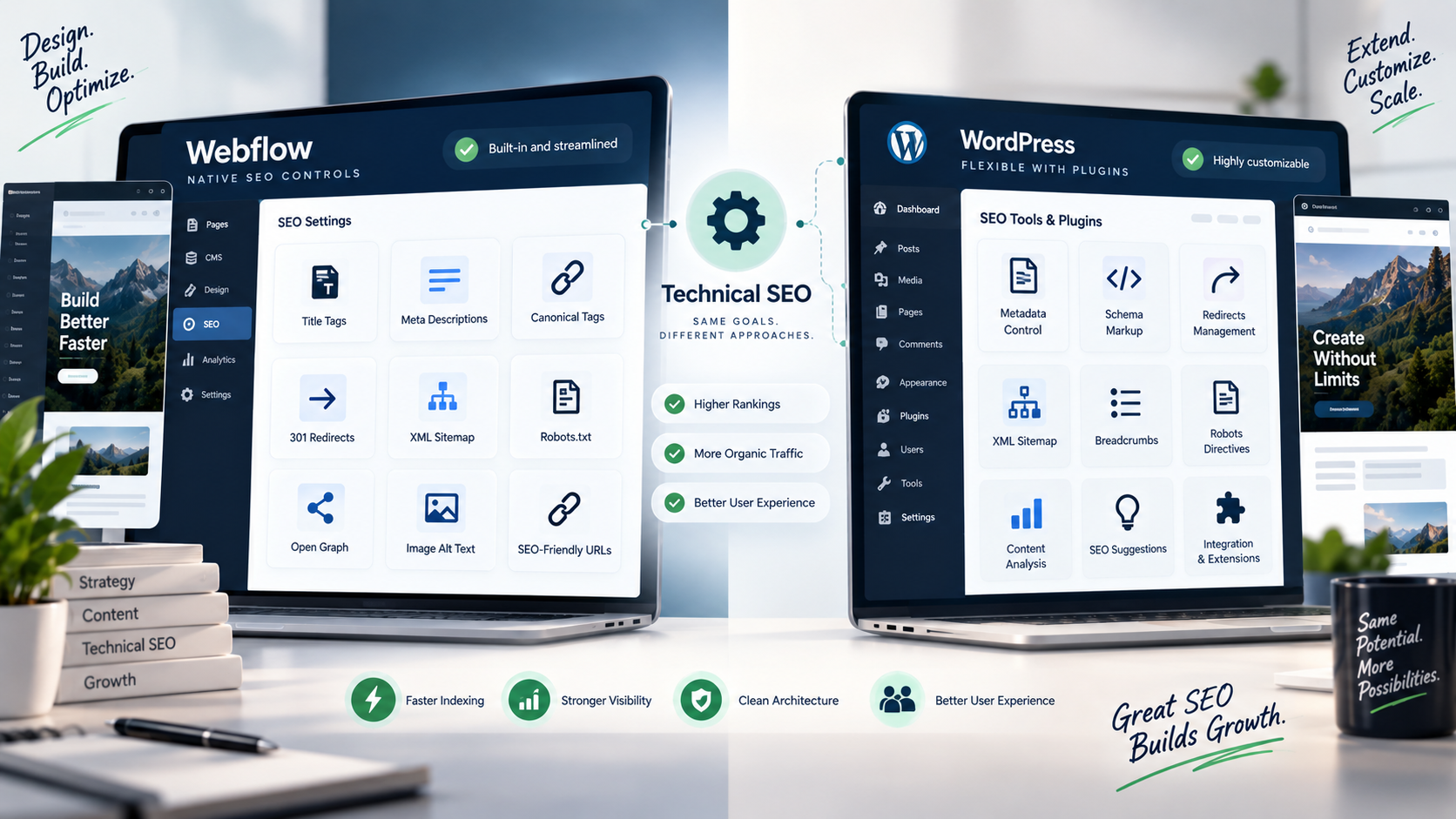
Technical SEO helps search engines crawl, understand, and index your website efficiently. Even the best content can struggle to rank if your website has technical issues.
Fortunately, both Webflow and WordPress provide the essential tools for technical SEO—but they take very different approaches.
Webflow's Built-In SEO Features
Webflow includes many SEO essentials out of the box, reducing the need for additional software.
With Webflow, you can easily manage:
- Custom title tags and meta descriptions
- Canonical tags
- 301 redirects
- XML sitemaps
- Robots.txt
- Open Graph settings
- Alt text for images
- SEO-friendly URLs
For businesses focused on efficiency, this simplicity is a major advantage—it lets your team spend less time troubleshooting and more time driving results.
WordPress Offers Greater Flexibility
WordPress also supports all major technical SEO requirements—but most features are enabled via plugins.
Popular SEO plugins such as Yoast SEO, Rank Math, and All in One SEO provide powerful capabilities, including:
- XML sitemap generation
- Schema markup
- Redirect management
- Meta tag customization
- Breadcrumbs
- Advanced robots directives
- Social metadata
- Content analysis
This option lets SEO experts change everything about how a website is optimized.
Technical SEO Comparison
Verdict: Webflow makes technical SEO easier, while WordPress offers users more customization options.
Content Marketing & Blogging
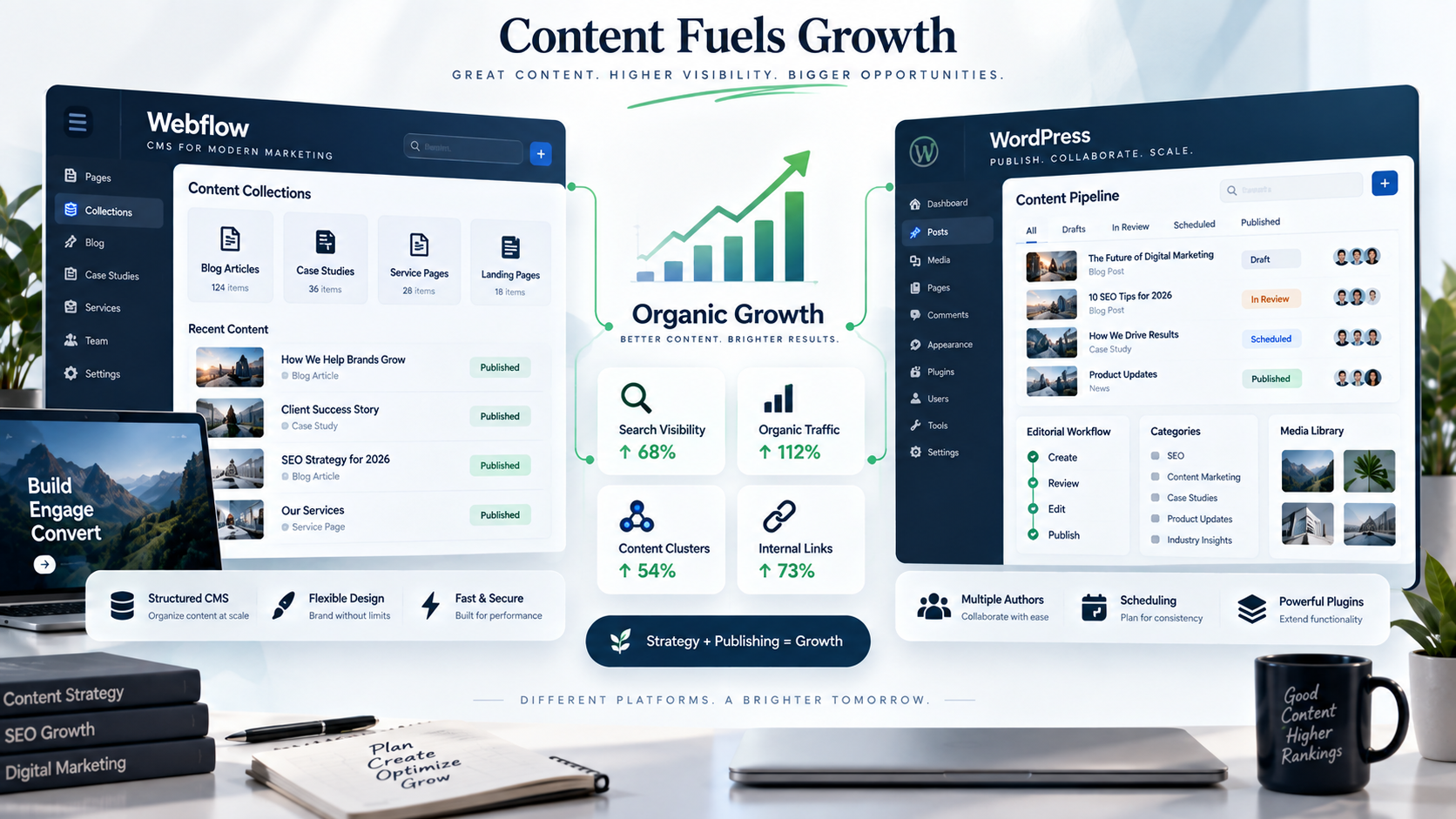
Content remains one of the strongest drivers of long-term SEO success. Whether you're publishing blog articles, landing pages, case studies, or industry insights, your CMS should make content creation efficient and scalable.
Blogging in Webflow
Webflow's CMS is designed for structured content and visually appealing layouts.
It is great for businesses that have:
- Company blogs
- Case studies
- Team pages
- Portfolio projects
- Service pages
Content creators benefit from:
- A clean interface to edit
- Custom content collections
- Flexible page design
- Consistent branding
However, if your publishing workflows get complex or you need advanced content structures, you may need a developer's help to keep things running smoothly.
Blogging in WordPress
WordPress started as a blogging platform. It is still very good at publishing content.
Its strengths include:
- Easy post creation
- Category and tag management
- Editorial workflows
- Multiple author support
- Scheduled publishing
- Extensive media management
For organizations producing a lot of content, WordPress offers mature publishing tools that make it easier to scale your content marketing and drive more organic growth.
If content marketing is central to your SEO strategy, WordPress offers a slight advantage due to its flexibility and robust ecosystem.
SEO Plugins vs. Native Features
This is one of the biggest differences between the two platforms.
Webflow's Philosophy
Webflow aims to offer essential SEO functionality without relying on third-party plugins.
Benefits include:
- Faster websites
- Fewer compatibility issues
- Lower maintenance
- More consistent performance
The tradeoff is that if you need advanced SEO features, you might need to invest in custom code or third-party integrations.
WordPress's Philosophy
WordPress allows you to customize nearly every aspect of SEO using plugins.
Some popular tools for search engines are:
Rank Math
Known for:
- Advanced schema generation
- Keyword optimization
- Redirection management
- Local SEO settings
- WooCommerce SEO
Yoast SEO
A favorite that offers:
- Content readability analysis
- XML sitemaps
- Meta management
- Internal linking suggestions
- Breadcrumb controls
This ability to change things makes WordPress appealing to people who work on search engines and want to have control over optimization.
But if you overload your site with plugins, you risk slowing it down and increasing your maintenance workload—which can hurt both SEO and conversions.
Security & Website Maintenance
Website security may not be a direct ranking factor, but it plays a crucial role in protecting your SEO performance.
A hacked website, broken plugin, or extended period of downtime can significantly affect your search visibility and user trust.
Webflow Requires Minimal Maintenance
Because Webflow is a hosted platform, much of the maintenance happens behind the scenes.
Users don't need to worry about:
- Plugin updates
- Server maintenance
- Security patches
- Software version updates
This means that business owners can focus on making their website and getting more people to visit it instead of spending all their time dealing with technical issues.
WordPress Requires Ongoing Management
WordPress gives you more control, but that control comes with extra responsibility for keeping your site secure and high-performing.
To keep your website running, you have to do some regular tasks like:
- Updating WordPress core
- Updating themes & plugins
- Keeping an eye on security
- Creating backups
- Checking for compatibility issues
Ignoring updates can lead to:
- Broken functionality
- Security vulnerabilities
- Slower performance
- SEO issues
That's why many businesses invest in managed WordPress hosting or maintenance services—to keep their site running smoothly and protect their SEO investment.
Design Flexibility & User Experience
SEO isn't just about keywords and metadata. Google increasingly rewards websites that provide an exceptional user experience.
A beautiful, intuitive website encourages visitors to stay longer, explore more pages, and convert into customers.
Webflow Excels at Visual Design
Webflow gives designers a lot of freedom to create.
Without using many templates, developers can build:
- Custom animations
- Interactive designs
- Unique landing pages
- Modern responsive websites
- High-converting user experiences
This makes Webflow perfect for brands that want a unique website that converts visitors into customers.
The important thing is to balance. Using many animations or visual effects can slow down the site if not done right.
WordPress Offers Unlimited Customization
WordPress also supports any design through custom page builders or special coding.
Popular tools include:
- Elementor
- GeneratePress
- Kadence
- Bricks Builder
- Gutenberg
Because WordPress has such a large ecosystem, businesses have almost unlimited design possibilities.
But if you use poorly coded themes or page builders, you can end up with bloated code that drags down your site's performance and hurts your conversion rates.
User Experience Matters More Than Platform
No matter if your website is built on Webflow or WordPress, visitors to your site are looking for:
- Fast-loading pages
- Mobile-friendly designs
- Clear navigation
- Content that's easy to read
- Accessible features
- Logical page structure
Google rewards websites that make it easy for users to find information and complete their goals.
The platform is just the framework. Great user experience—and the conversions that follow—come from thoughtful design and a strategic approach to development.
Which Platform Wins This Round?
Here's a quick summary:
The right choice isn't about which platform has more features—it's about which one aligns with your business goals, your team's resources, and your long-term SEO and growth strategy.
Which Platform Is Better for Different Businesses?
Every business has unique requirements. The CMS that works well for a creative agency may not be the best fit for an eCommerce store or a content publisher.
Here's how Webflow and WordPress compare across different business types.
Small Businesses
For many small businesses, the priorities are simple:
- A professional website
- Strong local SEO
- Fast loading speeds
- Easy maintenance
- Affordable long-term ownership
Webflow is a great choice if you:
- Want a modern, custom-designed website.
- Don't want to manage plugins or software updates.
- Publish occasional blog posts.
- Prefer an all-in-one hosting solution.
WordPress is ideal if you:
- Plan to invest heavily in content marketing.
- Need advanced features as your business gets bigger.
- Want flexibility so you don't have to start from scratch later.
Best Choice: It depends on your growth strategy. Webflow offers simplicity, while WordPress provides room for expansion.
Local Businesses
For local service businesses such as dentists, contractors, law firms, or marketing agencies, local SEO is often more important than publishing hundreds of blog posts.
Both platforms support:
- Local landing pages
- Google Business Profile integration
- Schema markup
- Contact forms
- Location pages
- Mobile-friendly design
If your website's main job is to generate leads, Webflow's speed and low-maintenance setup make it a smart choice for keeping your pipeline full.
Agencies
Marketing agencies often handle many client websites and need flexibility.
WordPress offers:
- Extensive plugin support
- Easy editing for clients
- Large developer community
- Easy scalability
On the other hand, Webflow is a fit for agencies that focus on custom design and want to spend less time on maintenance.
Best Choice:
- Design-first agencies → Webflow
- Content-heavy SEO agencies → WordPress
SaaS Companies
SaaS businesses usually focus on:
- Landing pages
- Product pages
- Conversion optimization
- Website speed
- Brand consistency
Webflow excels at building visually engaging marketing websites that don't require constant maintenance—so your team can focus on driving signups and conversions.
Many SaaS companies use Webflow for their marketing website while managing their application separately.
eCommerce Businesses
If your online store has hundreds or thousands of products, WordPress with WooCommerce offers options.
Benefits include:
Advantages include:
- Advanced product management
- Extensive payment integrations
- Inventory management
- SEO plugins
- Large extension ecosystem
Webflow Ecommerce is a good fit for smaller online stores, but as your product catalog grows, you may hit limitations that slow down your ability to scale and drive revenue.
Content Publishers
If publishing articles is a central part of your business, WordPress is still one of the best content management systems available.
Its publishing capabilities include:
- Multiple authors
- Editorial workflows
- Category management
- Scheduling
- Revisions
- Plugin integrations
For businesses publishing a lot of content regularly, WordPress usually delivers a smoother editorial workflow—helping you scale your content and organic reach.
Common SEO Mistakes When Migrating Between Webflow and WordPress
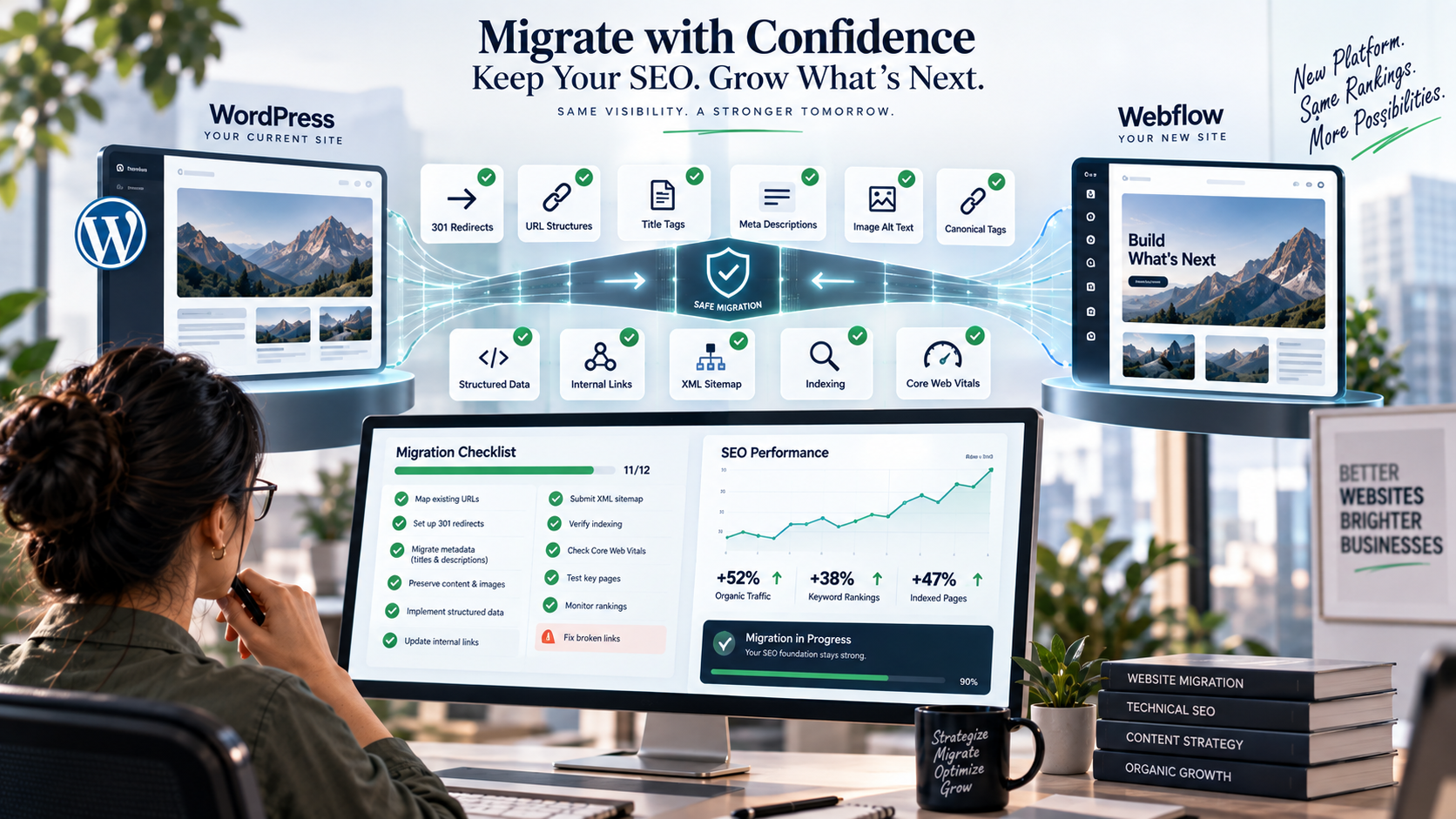
Many businesses think changing platforms will immediately improve rankings.
Unfortunately, a poorly managed migration can do more damage to your SEO than sticking with your old website ever would.
Here are some of the most common mistakes to avoid.
1. Forgetting 301 Redirects
Changing URLs without implementing redirects is one of the fastest ways to lose rankings.
Every important page should redirect to its new equivalent to preserve existing authority and ensure users reach the correct destination.
2. Changing URL Structures Unnecessarily
If your current URLs are working well, do not change them unless you have a clear reason.
Keeping your URLs the same reduces disruption and helps you keep your search visibility.
3. Losing Metadata
When you move to a website, businesses sometimes forget to move:
- Title tags
- Meta descriptions
- Image alt text
- Canonical tags
- Structured data
You should review these elements carefully before you launch your new website.
4. Ignoring Internal Links
Internal links help search engines understand how your website is organized.
After you move to a website:
- Check for broken links.
- Update navigation.
- Review contextual links within blog articles.
- Make sure all important pages are still findable.
5. Forgetting to Test Indexing
When your new website is live:
- Send your XML sitemap to Google Search Console.
- Check indexing status.
- Monitor crawl errors.
- Review Core Web Vitals.
- Track keyword rankings.
Migration doesn't end at launch. You need to keep monitoring your SEO performance to protect your rankings, leads, and revenue.
Final Verdict: Which CMS Wins for SEO?
After comparing everything, one thing is clear:
There isn't a universal winner.
The best platform is the one that matches your business goals and supports your growth strategy.
The Real Winner?
Webflow and WordPress do not directly affect your Google search rankings. Your website's search engine optimization (SEO) performance depends on several key factors: high-quality content, technical optimization, Core Web Vitals, user experience, internal linking, website structure, the authority of your backlinks, and a consistent SEO strategy. Both Webflow and WordPress provide the necessary tools to implement such a strategy effectively.
Conclusion
Choosing between Webflow and WordPress isn't really about choosing a "better" CMS—it's about choosing the right foundation for your business.
Webflow gives you simplicity, speed, and a streamlined experience. It makes things easy for your team so they can focus on making your website look good and work well. They don't have to worry about plugin problems. WordPress is very flexible. This makes it a good choice for businesses with many needs or that want to create a lot of content.
But here's what matters most: even the best platform can't make up for a smart, well-executed SEO strategy.
Organic growth doesn't come from your CMS. It comes from knowing your audience, publishing valuable content, keeping your website technically sound, and always improving the user experience.
Whether you choose Webflow or WordPress, the websites that do well are the ones that change with search trends—not just with technology.
Build for your users first, optimize with clear goals, and let your platform support your strategy—not dictate it.
FAQs
Q. Is Webflow better than WordPress for SEO?
A. Neither platform is inherently better for SEO. Webflow has some built-in features that can help with search engine optimization. It also manages the hosting for you. WordPress is more flexible because you can add plugins and customize it to your needs. The best choice for you depends on your business needs and your technical capabilities.
Q. Does Google prefer Webflow or WordPress?
A. No. Google does not care which platform you use for your website. Rankings are determined by factors such as content quality, page experience, technical SEO, backlinks, and user satisfaction.
Q. Which platform is faster?
A. Webflow provides excellent performance out of the box, as it handles hosting and optimization. WordPress can be just as fast or even faster if you use quality hosting, simple themes, and optimize it well.
Q. Is WordPress better for blogging?
A. Yes. WordPress is one of the platforms for writing and publishing content. It has many features that make it easy to write and publish blog posts. Many plugins can help you.
Q. Can I migrate my WordPress website to Webflow without losing my SEO?
A. Yes. You can move your website from WordPress to Webflow without losing search engine ranking by planning carefully. Maintain website addresses, set up redirects, keep metadata, and make sure everything works well after launching your new site.