
Why Is GA4 Showing More Direct Traffic? How to Fix Attribution Issues and Measure Multi-Touch Marketing More Accurately
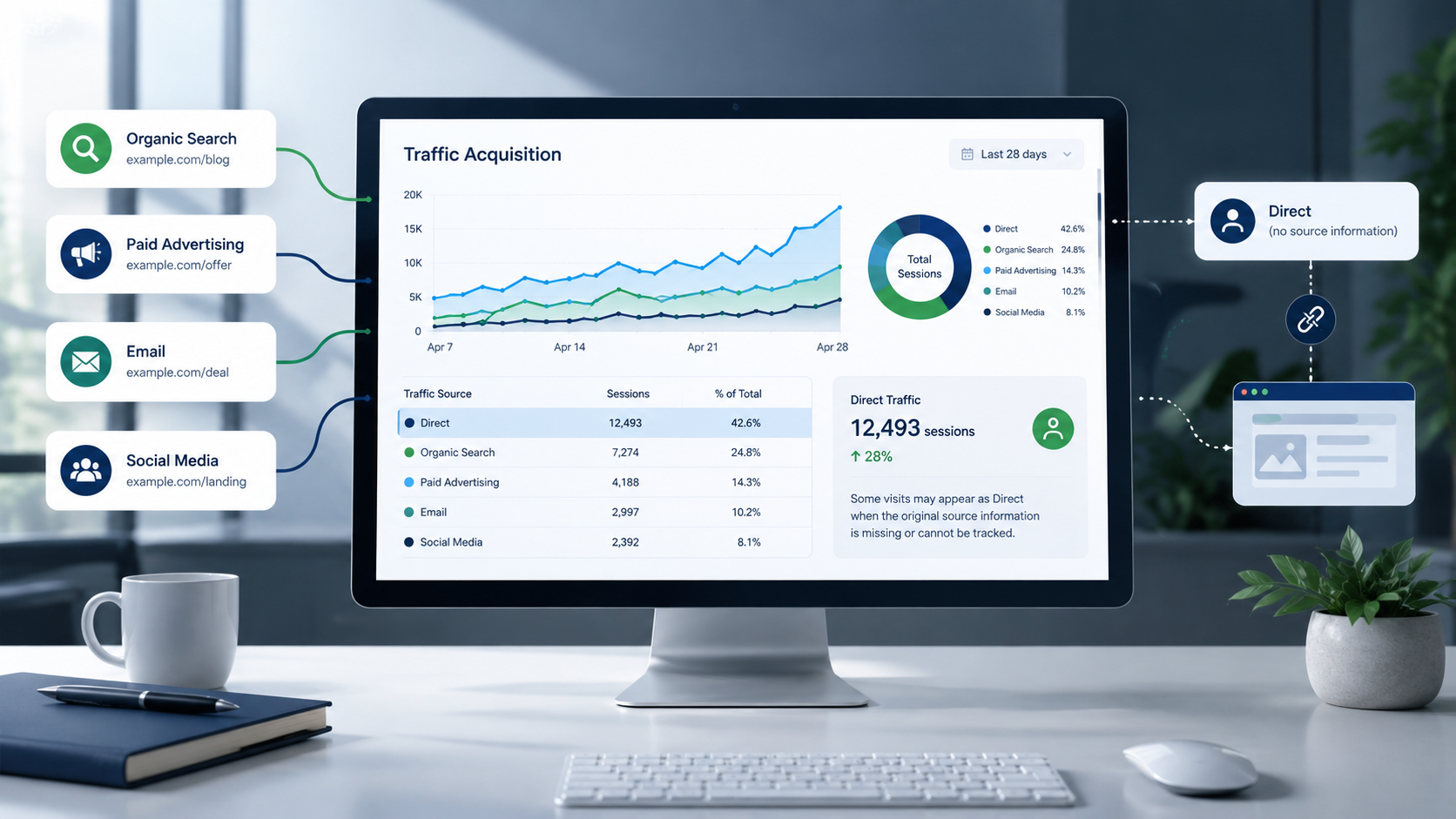
If you see a spike in Direct traffic in your GA4 reports, it usually doesn't mean more people are typing your URL directly. Most of the time, Direct traffic is just GA4’s default label when it cannot track where a visit came from.
This matters because leaving out attribution can make your marketing reports unreliable. When tracking fails, email campaigns, social posts, paid ads, and partner campaigns can all show up as Direct traffic.
You do not need to eliminate Direct traffic. Instead, find out where attribution is breaking, fix tracking issues you can control, and use several measurement methods to see how your marketing drives conversions and revenue.
What Does Direct / None Mean in GA4?
In GA4, (direct) / (none) generally means Google Analytics didn't receive usable information identifying where the session came from.
A genuinely direct visit can happen when someone:
- Types your URL into their browser
- Uses a bookmark
- Opens a saved browser history entry
- Returns to your website directly
But Direct can also appear when referral or campaign information is unavailable.
For example, imagine someone receives an email containing a link to your website. They click it, but the link has no UTM parameters, and the email environment does not pass referral information. GA4 may have no reliable way to identify the email as the source.
The visit can therefore appear as Direct.
That is why Direct traffic shouldn't automatically be treated as a high-performing marketing channel. Some of it may represent genuine brand-driven visits, while some may be previously identifiable traffic whose source information was lost.
Why Is GA4 Showing More Direct Traffic?
An increase in Direct traffic commonly points to one or more attribution gaps. The most common causes include:
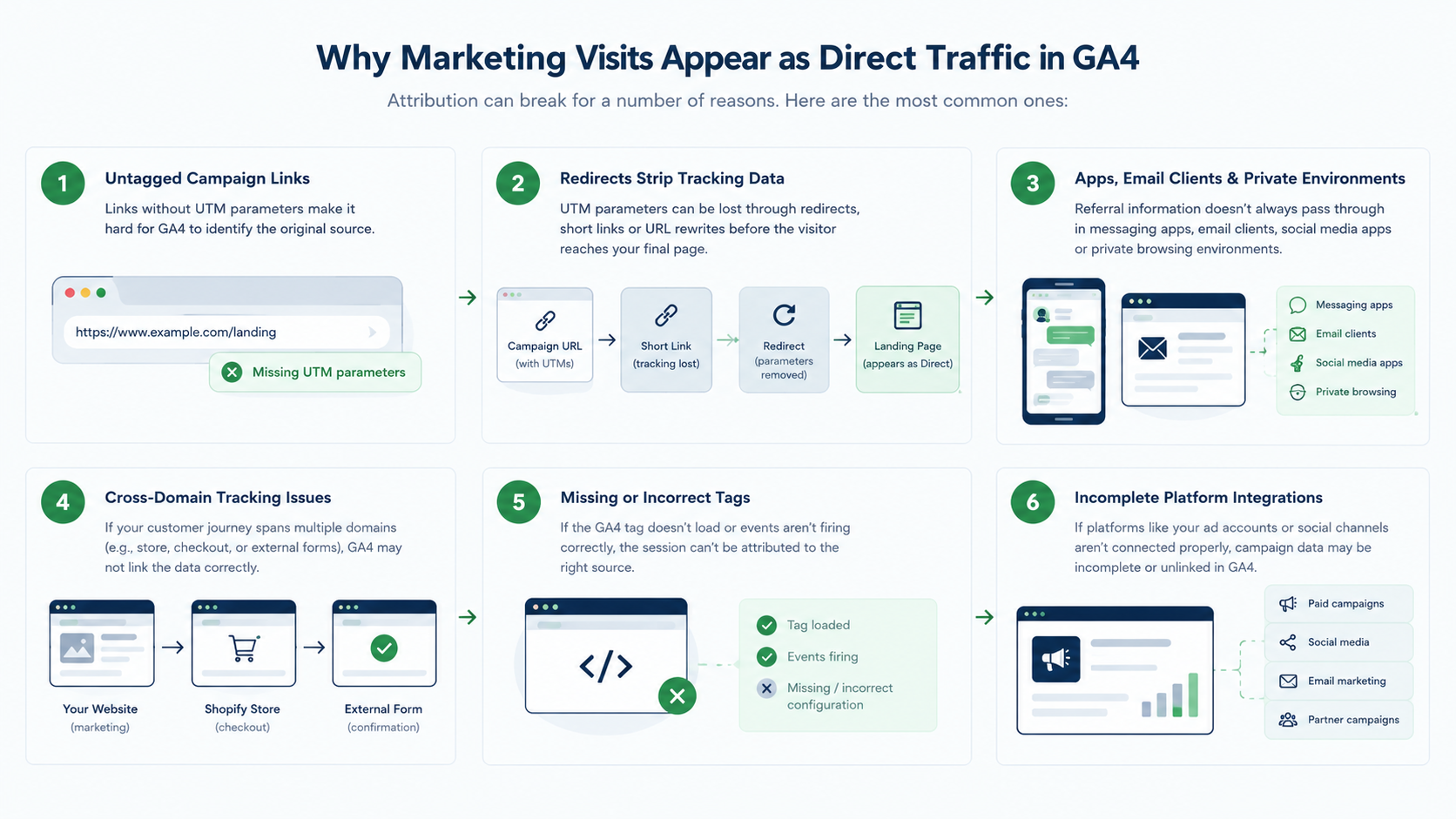
1. Campaign Links Do Not Have UTM Parameters
One of the most common reasons for unexpected Direct traffic is untagged campaign links.
Your marketing team may be promoting the same landing page through:
- Email newsletters
- LinkedIn posts
- Other social platforms
- Influencer campaigns
- Partner websites
- Paid campaigns
- QR codes
- Offline marketing
Without proper tracking, GA4 may not be able to distinguish these visits from Direct traffic.
For example, instead of sending users to:
https://www.example.com/demo
a campaign link could use:
https://www.example.com/demo?utm_source=linkedin&utm_medium=organic_social&utm_campaign=ga4-guide&utm_content=founder-post
The important point is consistency. Don't let each marketer invent their own naming convention.
2. Redirects Are Stripping Tracking Information
Your campaign URL can be correctly tagged and still lose its attribution information before the visitor reaches the final page.
This can happen through:
- 301 or 302 redirects
- Link shorteners
- HTTP-to-HTTPS redirects
- CMS rules
- CDN configurations
- Tracking platforms
- Security or URL-rewriting systems
For example:
Campaign URL → Short link → Redirect → Landing page
If the redirect strips out the query parameters, the UTMs might never make it to the final page.
When investigating a Direct traffic spike, test the entire redirect chain, not just the original campaign URL.
3. Traffic Comes From Apps, Email Clients, or Private Environments
Referral information doesn't always pass through in some environments.
Possible sources are:
- Messaging apps
- Social media apps
- In-app browsers
- Desktop email clients
- PDF documents
- Word documents
- QR codes
- Privacy-focused browsing environments
This doesn't mean that every visit from those sources gets counted as Direct. This means attribution can become less reliable once the original referral information is no longer available.
That is another reason campaign links should be tagged consistently.
4. Cross-Domain Tracking Is Not Configured Correctly
Suppose your marketing website is on one domain, but the conversion happens somewhere else:
Website → Shopify store → Checkout
Or:
Website → Booking platform → Confirmation
Or:
Marketing site → External form → Thank-you page
If GA4 isn't set up properly across these domains, the user's journey can end up fragmented.
You may see:
- Self-referrals
- Unexpected referral sources
- Broken sessions
- Lost campaign context
- Conversions attributed to the wrong source
Create a list of every domain involved in your conversion journey, then test the full path from campaign click to conversion.
5. GA4 Tags Are Missing or Firing Too Late
Sometimes the issue isn't with the campaign URL at all. The Google tag may not be collecting data correctly.
Look for the following:
- Landing pages that lack the Google tag
- Incorrect Google Tag Manager triggers
- Consent configuration problems
- Single-page application navigation issues
- Scripts that block analytics
- Events that fire after a user has already navigated away
A common troubleshooting mistake is checking only the GA4 reports. You also need to test what happens in the browser when a real visitor lands on the website.
6. Referral Exclusions or Ignored Referrals Are Misconfigured
Referral settings can affect how GA4 interprets traffic moving between systems.
Common examples include:
- Payment gateways
- Scheduling platforms
- CRM forms
- Authentication providers
- External checkout systems
You should apply referral exclusions carefully.
Don't block every referral domain just to make your report look cleaner. Keep a record of each exclusion and the business rationale.
7. Marketing Platform Integrations Are Incomplete
Advertising platforms can introduce another layer of attribution complexity.
For example, take a look at the following:
- Google Ads and GA4 linking
- Auto-tagging
- Click identifiers
- Campaign naming
- Imported campaign information
- Platform-specific UTMs
For platforms that are not automatically integrated with GA4, establish a consistent UTM structure.
Direct Traffic vs. Unassigned vs. (not set)
These GA4 labels are not interchangeable.
Before troubleshooting, confirm which dimension and report is showing the problem. Different attribution dimensions can produce different results.
How to Diagnose a Direct Traffic Increase
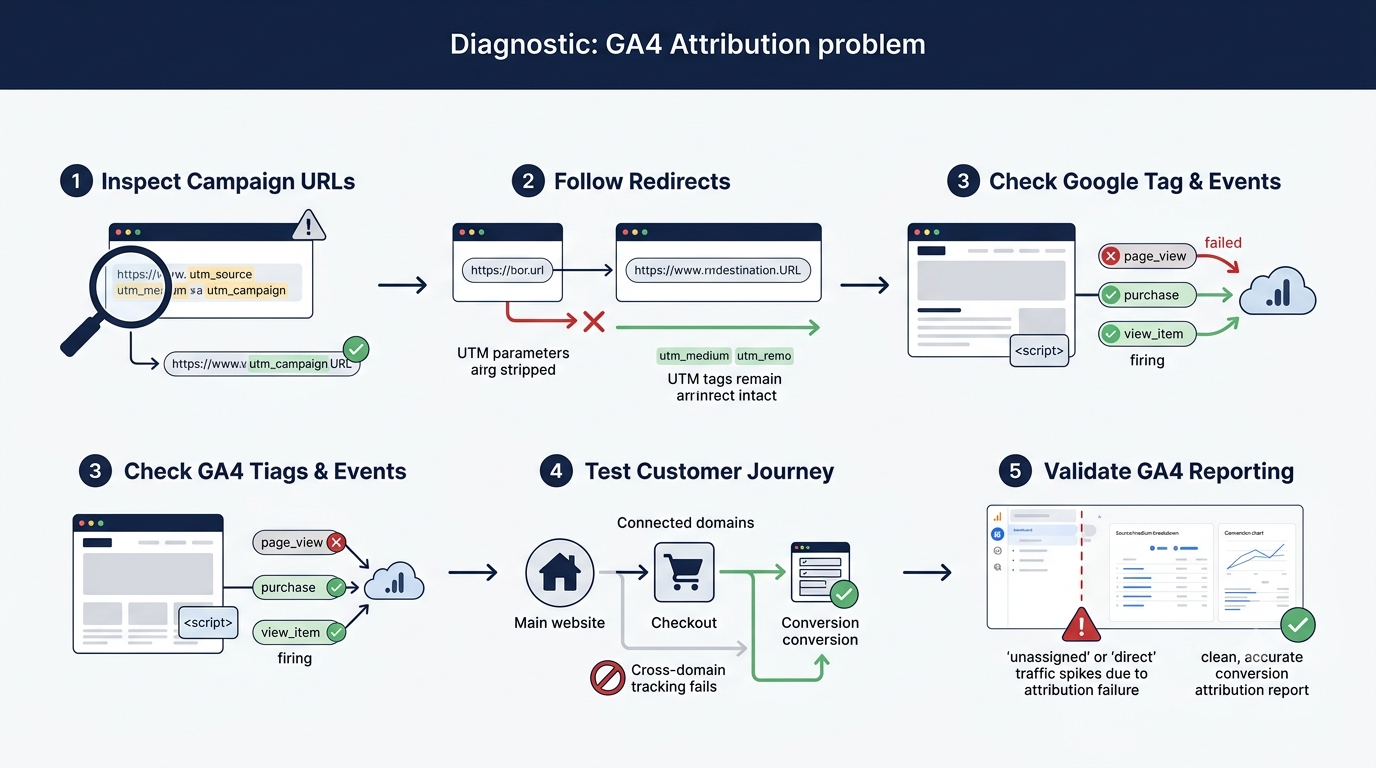
Follow a structured audit instead of changing multiple settings at once.
1. Confirm the Increase Is Real
Take a look at and compare the date ranges that match:
- Users
- Sessions
- Engaged sessions
- Conversions
- Revenue
Then segment the increase by:
- Landing page
- Device
- Geography
- Campaign period
Ask whether Direct traffic increased after a website redesign, CMS update, consent change, campaign launch, or analytics implementation change.
2. Review Landing Pages
Look for landing pages that get a lot of traffic in:
- Email campaigns
- Paid campaigns
- Social campaigns
- Partner campaigns
- Promotional campaigns
If Direct traffic suddenly concentrates on a campaign-specific landing page, investigate that campaign before assuming the increase represents genuine direct visits.
3. Divide Source and Medium Dimensions
Compare:
- First user source/medium
- Session source/medium
- Campaign dimensions
- Conversion attribution
This distinction matters because it answers different questions, and acquisition-level reporting differs from session-level reporting.
4. Test Campaign URLs
Open all tagged links in new browser windows.
Check that:
- The UTM parameters are present.
- They persist even through redirects.
- The Google tag loads on the destination page.
- The session appears under the intended source and medium.
5. Test Every Domain Transition
Trace the entire conversion path from start to finish.
For example:
LinkedIn → Website → Product page → Checkout → Purchase
Check whether the original marketing source holds up throughout the entire journey and whether any unwanted referral traffic appears after a domain transition.
How to Fix Direct Traffic Attribution in GA4
Build a Consistent UTM Framework
A basic UTM structure can include:
- utm_source — platform or publisher, such as LinkedIn or newsletter
- utm_medium — channel type, such as email, social, CPC, or referral
- utm_campaign — campaign name
- utm_content — creative, CTA, placement, or variation
- utm_term — paid-search keyword where applicable
The goal is not simply to add UTMs. Your team needs a documented naming convention that everyone follows.
Preserve parameters in redirects
Check every redirect along the way.
Please verify that the following is done:
- Query parameters remain intact
- Redirect rules do not rebuild URLs in the wrong way
- Link shorteners keep the tracking information
- CDN and security rules do not remove parameters
Configure Cross-Domain Measurement
List all domains involved in the customer journey.
Then:
- Configure the relevant domains in your GA4 web stream.
- Test campaign journeys across domains.
- Finish a test conversion.
- Look for any unwanted self-referrals.
- Verify that the original source is still available.
Fix Tags and Consent Implementation
Review your Google tag and Google Tag Manager setup.
Please check the following:
- Key landing pages have appropriate tags.
- GTM triggers fire correctly.
- Consent behavior functions as intended.
- Critical events occur before the navigation happens.
- Tracking gets disrupted when a website unintentionally releases something.
Include analytics as a regular part of your website QA, not just when it is time to report out.
Review Referral Exclusions Carefully
Exclude legitimate intermediaries where appropriate, especially payment or authentication systems that shouldn't receive conversion credit.
However, don't exclude data just to make your channel reports look better.
Connect Advertising Platforms
Where applicable, connect Google Ads and GA4 and verify:
- Auto-tagging
- Click identifiers
- Campaign naming
- Conversion configuration
For other advertising platforms, use consistent UTMs and maintain a documented campaign taxonomy.
Why Direct Traffic Makes Multi-Touch Measurement Difficult
A customer rarely converts after a single marketing interaction.
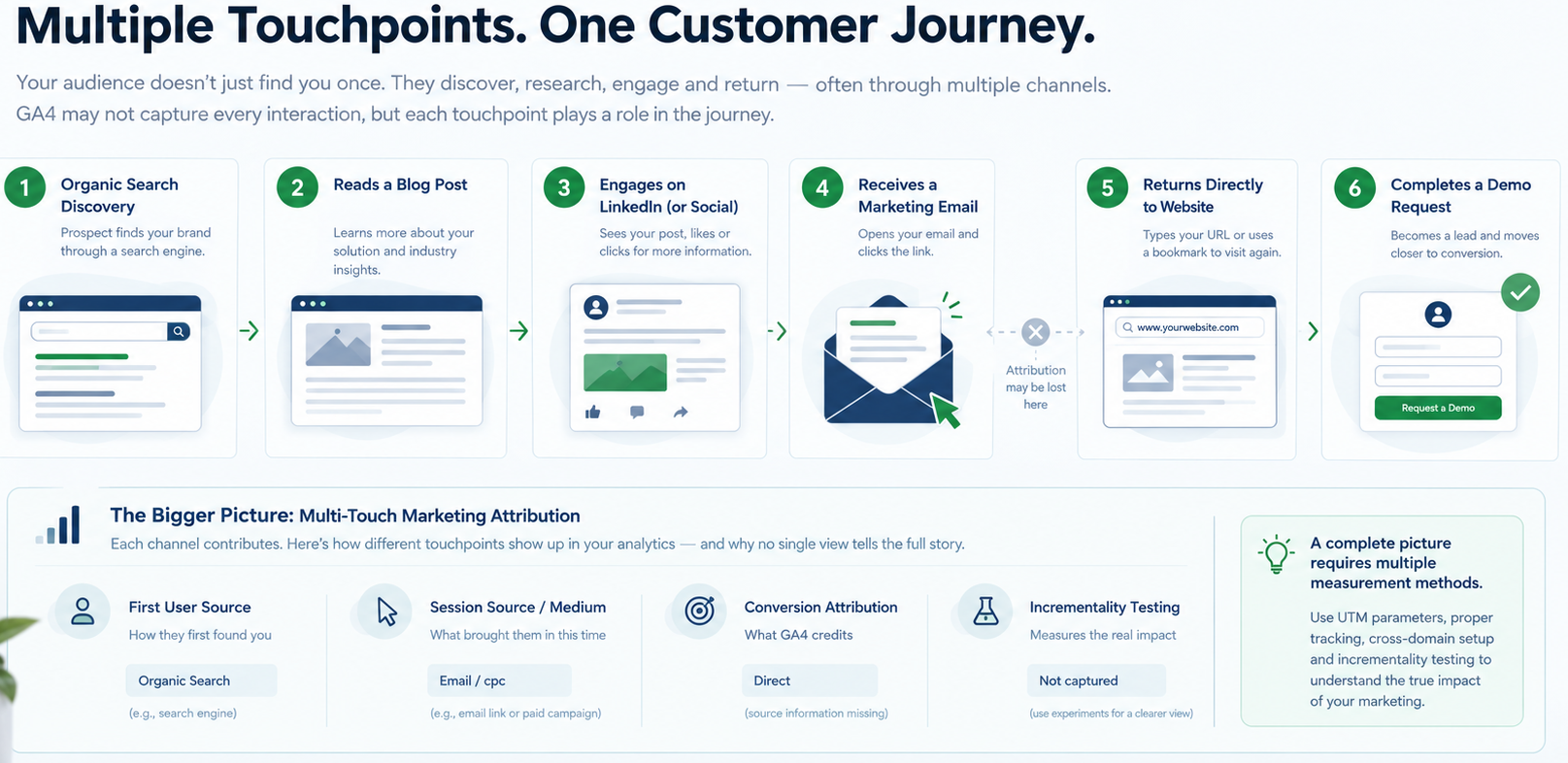
Here's what a typical journey might look like:
Google search → Blog post → LinkedIn → Email → Direct visit → Demo request
If the email or LinkedIn interaction doesn't include attribution data, the last visit may show as a Direct visit.
This creates a reporting problem.
A last-session report can focus too much on the final interaction it can identify, while earlier marketing activity disappears.
Returning users can create another complication. Someone may discover your company through search or social media, remember your brand, and later return by typing the URL directly.
GA4 cannot always observe every marketing interaction across devices, browsers, apps, privacy restrictions, and offline activity.
So treat attribution as a measurement system with limitations—not a perfect record of every customer touchpoint.
How to Measure Marketing More Accurately
Use Multiple Attribution Views
Instead of relying on one report, compare:
- First user source/medium for acquisition
- Session source/medium for the current visit
- Key-event or conversion attribution for conversion influence
- Paid and organic platform reports for channel-specific diagnostics
Each view answers a different question.
Combine Attribution With Experiments
Attribution reports have value, but they don't show incremental impact.
Where it makes sense, add these to them:
- Geo tests
- Holdout groups
- Landing-page experiments
- Incrementality testing
Then compare each channel's reported performance against actual pipeline and revenue results.
FAQs
1. Is Direct traffic always traffic from people typing my URL?
No. Direct traffic may include real direct visits, but it can also capture sessions where GA4 couldn't recognize usable campaign or referral details.
2. Why did my email traffic become Direct in GA4?
Email links may not include UTMs, the email environment may not pass referral information, or a redirect may remove campaign parameters.
3. Does more Direct traffic mean stronger brand awareness?
Not necessarily. Some Direct traffic may reflect brand familiarity, but an unexpected increase can also indicate incomplete or lost attribution data.
4. What is the best attribution model for multi-touch marketing?
No single model works for every business. Take a look at a few GA4 attribution views, compare your marketing activity with CRM pipeline and revenue, and run experiments or incrementality tests whenever you can.
Final Thoughts
Direct traffic doesn't always mean people found you on their own. Sometimes it shows that parts of your marketing story are missing. When GA4 can't tell where your visitors came from, your reports may make successful campaigns look invisible and lead you to invest in the wrong channels.
To begin, take a look at your UTM parameters, cross-domain tracking, referral exclusions, and consent settings. Before adjusting your marketing budget, spot any gaps by comparing your campaign reports with your GA4 data.
Not sure whether your Direct traffic is genuine or the result of an attribution gap? Connect with 253 Media to strengthen your analytics, improve attribution, and make more confident marketing decisions. A GA4 and marketing attribution audit can help identify the tracking issues affecting your campaigns and conversion reporting.