Why Is Performance Max Optimizing for the Wrong Conversions? How to Fix Low-Quality Signals After Tracking or Domain Changes
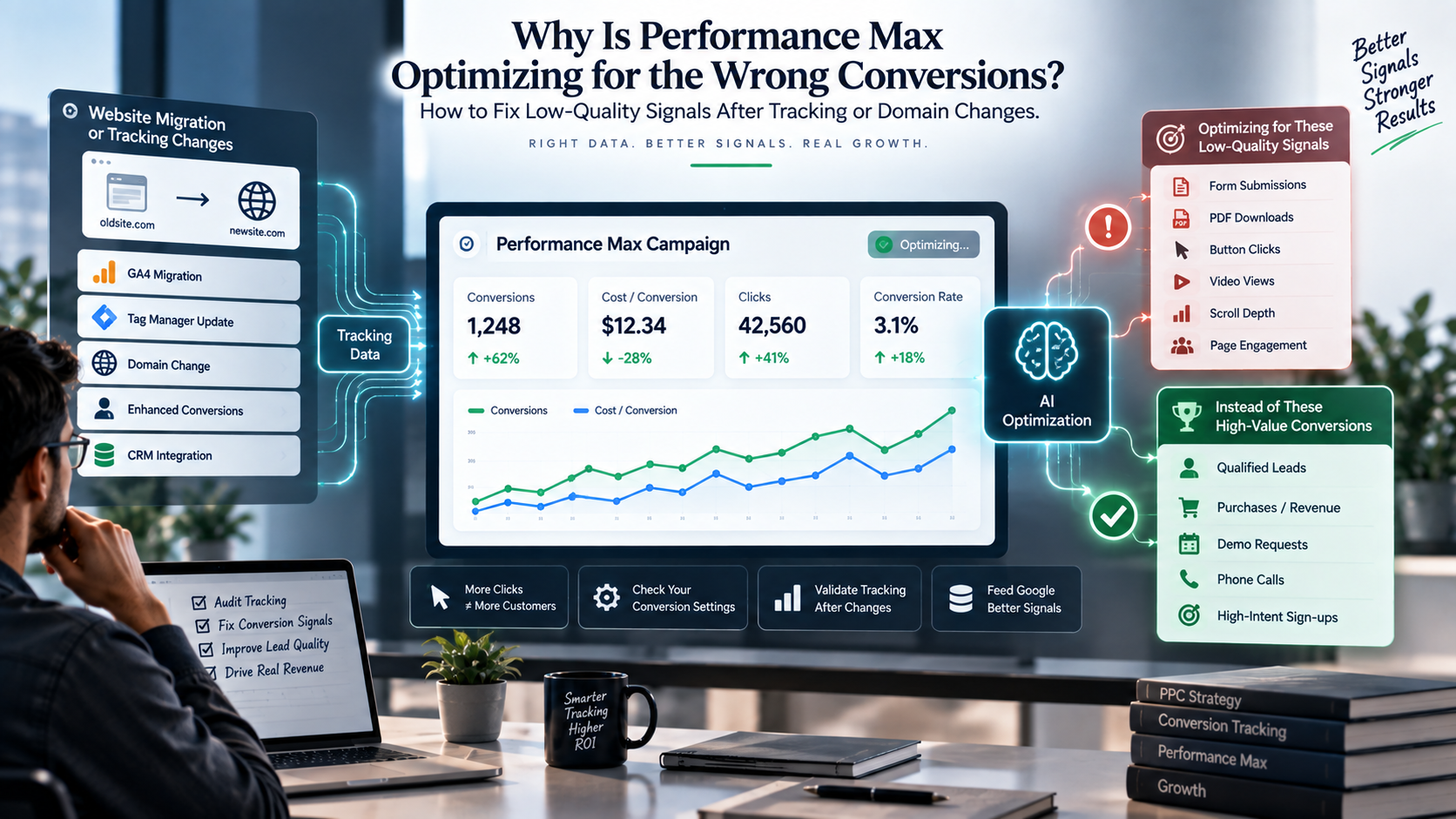
What if your Performance Max campaign isn’t actually underperforming? What if it’s just following the signals you’ve (maybe accidentally) set up? After a tracking update, GA4 migration, or domain change, Google’s automation can start chasing the wrong conversions, so you get more clicks and leads, but fewer real customers. Let’s break down why this happens, how tracking changes can send the wrong signals, and what you can do to get your campaigns driving real growth again.
How Performance Max Actually Learns
Many advertisers assume Performance Max knows how to identify valuable customers.
It doesn't.
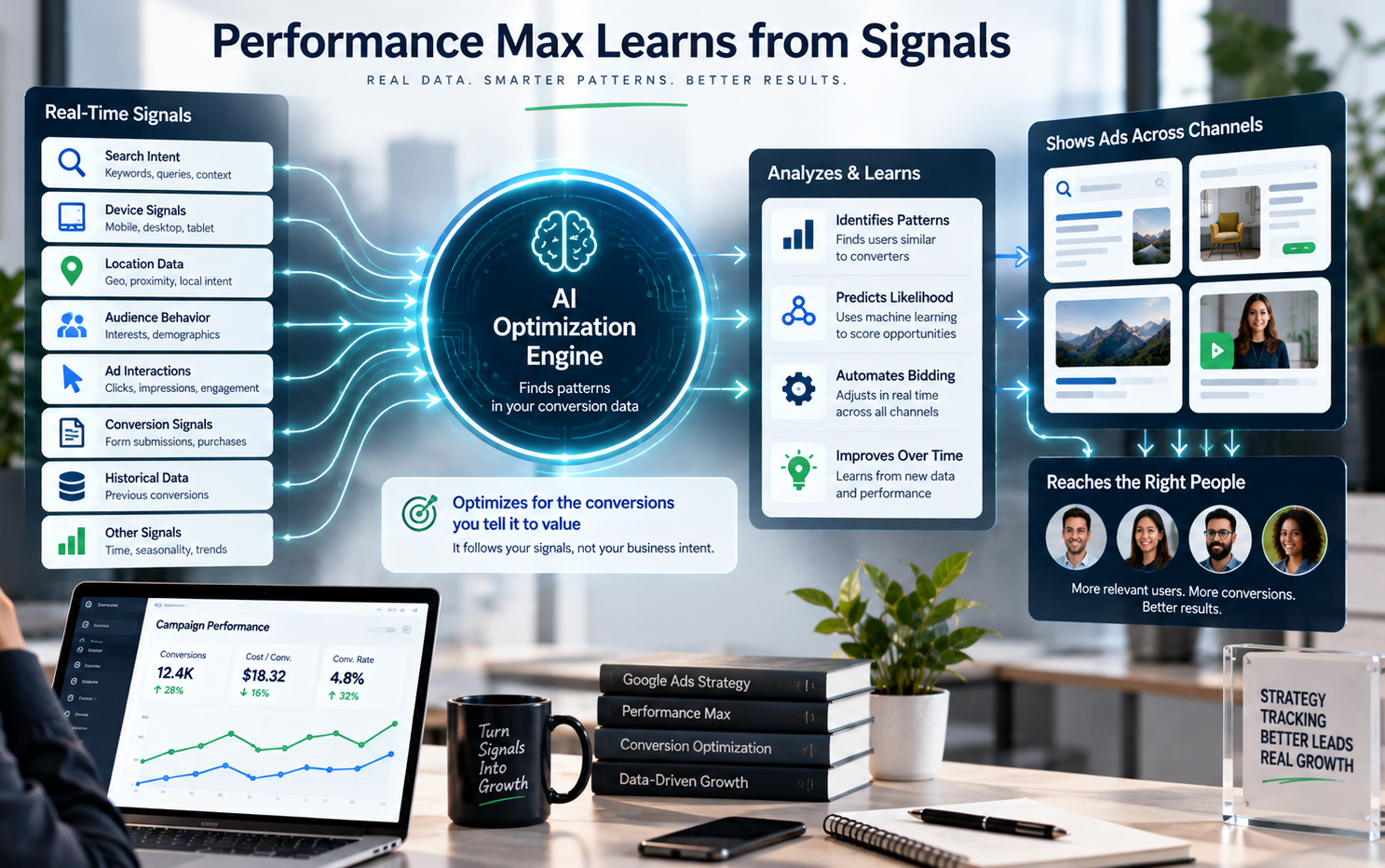
Performance Max is designed to recognize patterns, not business intent. Google's machine learning algorithm can identify users with similar behavior to those who click your ad and convert, then show your ads to more people like them.
The platform considers thousands of real-time signals, including search intent, device, location, audience behavior, and previous conversion data. Over time, it becomes increasingly confident about which users are most likely to complete your defined conversion.
Here’s the catch: Performance Max only optimizes for the conversions you tell it to value, not the ones that actually drive revenue for your business.
If your campaign is set up to treat newsletter sign-ups, PDF downloads, or button clicks as primary conversions, Google assumes those are your main goals. The algorithm will chase users who are likely to do those things — even if they never buy from you.
That's why campaigns can report:
- More conversions
- Lower cost per conversion
- Higher conversion rates
Meanwhile, your sales team is dealing with lower-quality leads and closing fewer deals.
The campaign isn't broken. It's simply following the signals you've given it.
Why Tracking or Domain Changes Cause Performance Max to Optimize Incorrectly
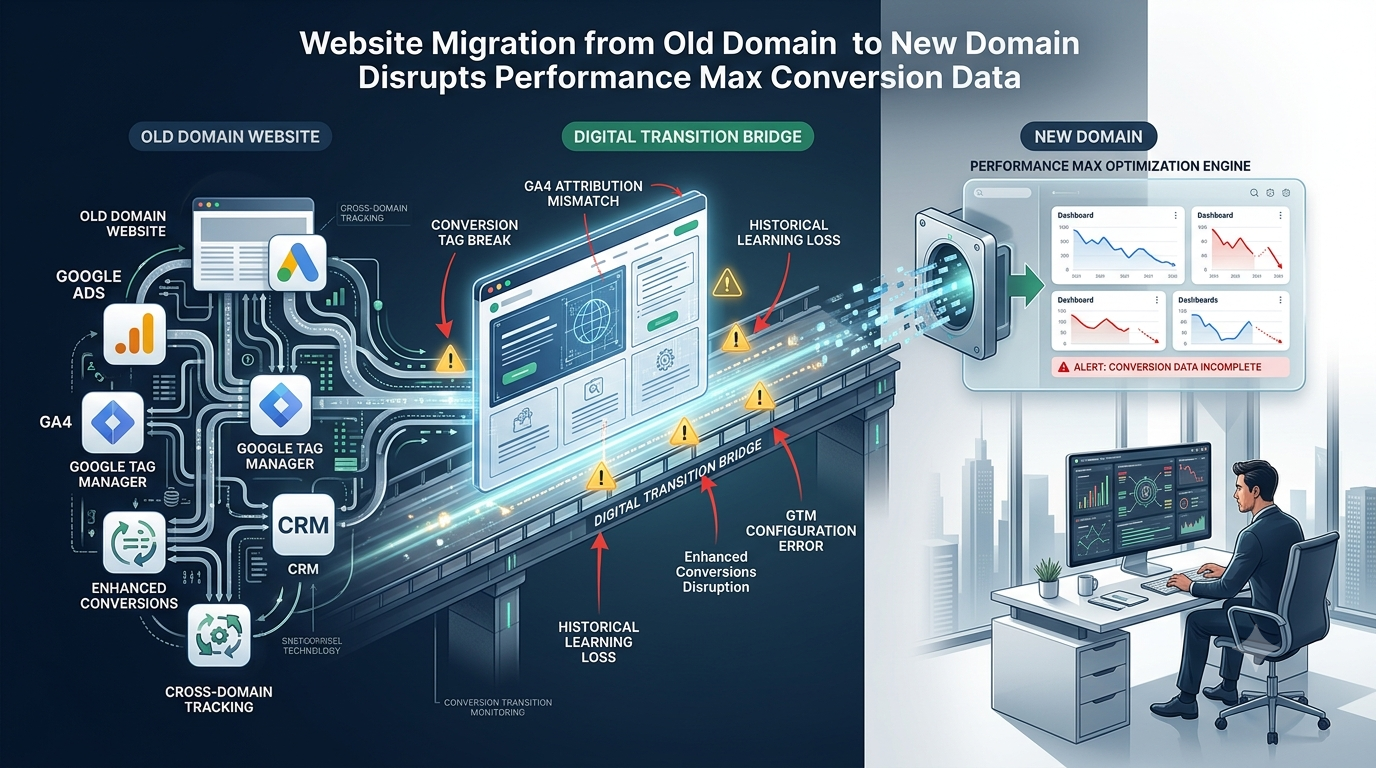
One of the biggest content gaps in existing Performance Max articles is the impact of tracking changes on machine learning.
Many businesses notice a drop in lead quality after:
- Migrating to a new website
- Changing domains
- Switching to GA4
- Updating Google Tag Manager
- Adding Enhanced Conversions
- Integrating a CRM
These updates might seem unrelated to campaign performance, but they directly impact the data Performance Max uses to learn and optimize. That means your bottom line can take a hit if the signals go off track.
For example, after a GA4 migration, your account may begin importing events such as:
- Scroll depth
- Video views
- Button clicks
- Session engagement
If any of these are accidentally set as Primary Conversions, Google's algorithm immediately treats them as business goals.
Because these actions happen far more often than real sales inquiries, Performance Max starts optimizing for users who just click, engage, or browse—instead of those who are actually ready to buy.
Similarly, a domain migration can interrupt:
- Conversion tags
- Enhanced Conversions
- Cross-domain tracking
- Attribution
- Historical learning
Even when your new website functions perfectly for visitors, Google's machine learning may suddenly receive incomplete or inaccurate conversion data.
The result? Your campaign looks healthy in Google Ads, but over time, it starts attracting lower-quality traffic that doesn’t convert into revenue.
The real issue isn’t your bidding strategy.
It’s the quality of the signals guiding Google’s algorithm—and that’s what drives your results.
Five Reasons Performance Max Starts Chasing Low-Quality Conversions
Understanding what causes poor-quality signals is the first step to fixing them—and getting your campaigns back on track to drive real growth.
1. Duplicate Conversion Actions
Many accounts are tracking the same conversion more than once via Google Ads, GA4, GTM, or CRM imports.
If duplicate actions are classified as Primary Conversions, Google will misrepresent the campaigns' performance and optimize for the wrong data.
Regularly review your conversion settings and remove any duplicate primary actions. This keeps your data clean and your campaigns focused on real business goals.
2. Micro-Conversions Are Set as Primary
Actions such as:
- Newsletter sign-ups
- PDF downloads
- Video views
- Scroll depth
are valuable engagement metrics but rarely represent revenue.
Keep these as Secondary Conversions. That way, you can still report on engagement, but Google won’t optimize your budget around actions that don’t drive revenue.
3. Incorrect Conversion Values
For e-commerce campaigns, Smart Bidding depends on accurate revenue values.
If your purchase data imports the wrong values, or every transaction shows the same amount, Performance Max can’t tell the difference between your best customers and everyone else. That means you miss out on optimizing for higher revenue.
4. Broken Enhanced Conversions
Enhanced Conversions improve attribution by securely matching first-party customer information.
Website redesigns, form changes, or CRM updates can quietly break Enhanced Conversions, lowering the quality of the data Google uses to optimize your campaigns and hurting your results.
5. Cross-Domain Tracking Issues
If customers move between multiple domains before converting—for example:
Website → Checkout
or
Landing Page → Booking Platform
If cross-domain tracking is missing, Google loses sight of part of your customer journey. That weakens your attribution and makes the algorithm less effective at finding buyers.
How to Audit and Retrain Performance Max
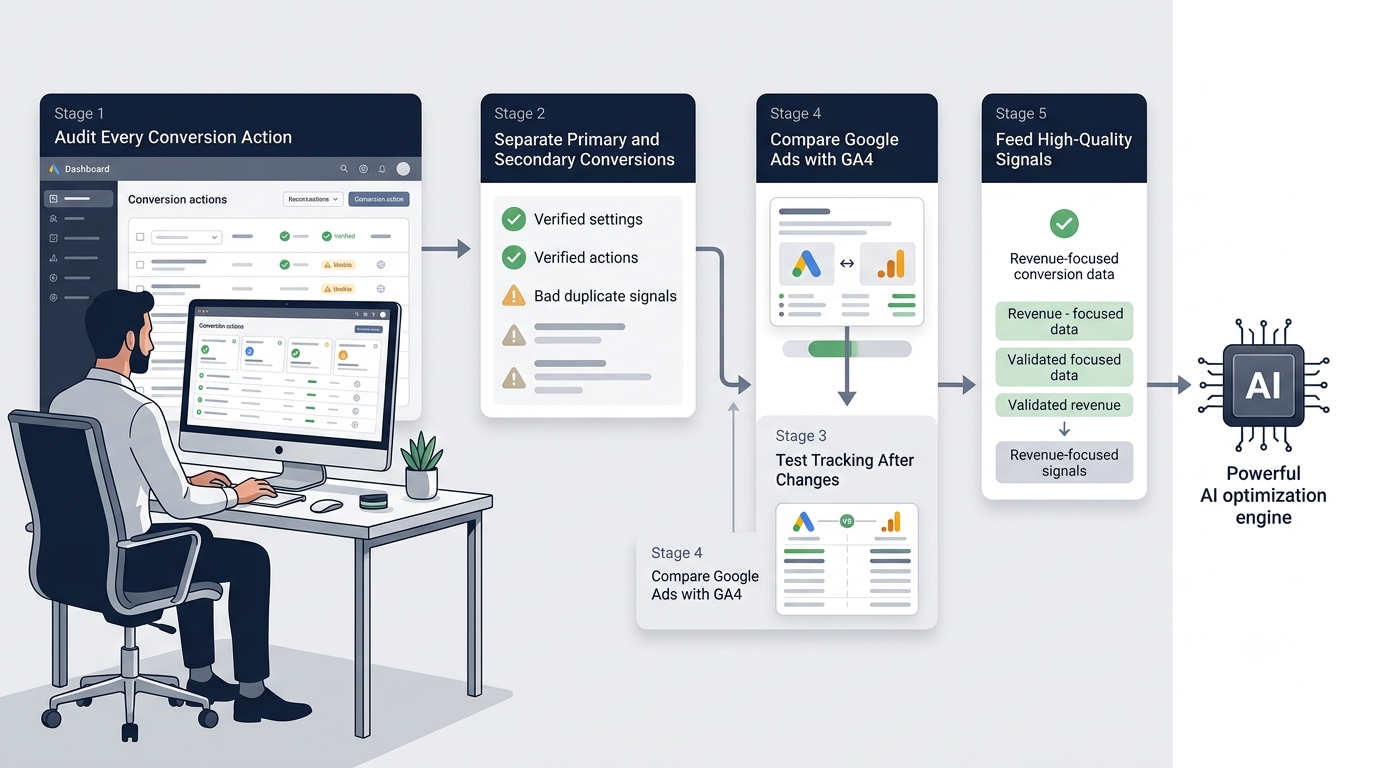
If your campaign starts bringing in low-quality leads, don’t rush to tweak your bids or throw more budget at the problem. Start by auditing your conversion data. Most of the time, Performance Max isn’t making bad decisions—it’s just learning from bad signals.
1. Audit Every Conversion Action
First, check all the conversion actions in Google Ads.
Ask yourself:
- Does this conversion represent a real business goal?
- Is it still relevant?
- Is it being tracked more than once?
- Should it influence automated bidding?
Remove any outdated or duplicate conversions that don’t support your current business goals. This keeps your campaigns focused on what actually drives growth.
2. Separate Primary and Secondary Conversions
One of the easiest ways to improve your signal quality is to make sure your conversions are classified correctly.
Primary Conversions should directly reflect business success, such as:
- Purchases
- Qualified lead forms
- Demo requests
- Consultation bookings
Secondary Conversions should be used for reporting only, including:
- Newsletter sign-ups
- PDF downloads
- Video views
- Scroll depth
This keeps Google focused on actions that actually generate revenue, not just engagement.
3. Test Your Tracking After Every Website Change
Website migrations and redesigns often sneak in hidden tracking issues that can quietly derail your campaigns.
Whenever you launch a new website or update your tracking setup, manually complete each important conversion and verify that:
- Google Ads records the conversion correctly.
- GA4 records the same event.
- Conversion tags fire only once.
- Thank-you pages trigger the correct events.
- Enhanced Conversions continue working.
A quick post-launch audit can save you weeks of wasted ad spend and lost leads.
4. Compare Google Ads with GA4
Google Ads and GA4 don't always report the same numbers, as they use different attribution models. If there are large differences, there is typically a tracking issue.
If you see conversions spike in one platform but not the other, dig in and investigate before making any campaign changes. This can save you from optimizing based on bad data.
5. Feed Google Better Signals
Once tracking has been corrected, help Performance Max learn from higher-quality data.
Whenever possible, optimize toward signals such as:
- Sales-qualified leads
- Closed deals imported from your CRM
- Verified purchases
- Accurate revenue values
- Offline conversions
The more accurate your conversion data is to actual business results, the more customers Google can identify who will actually purchase from you.
Why Conversion Quality Matters More Than Conversion Volume
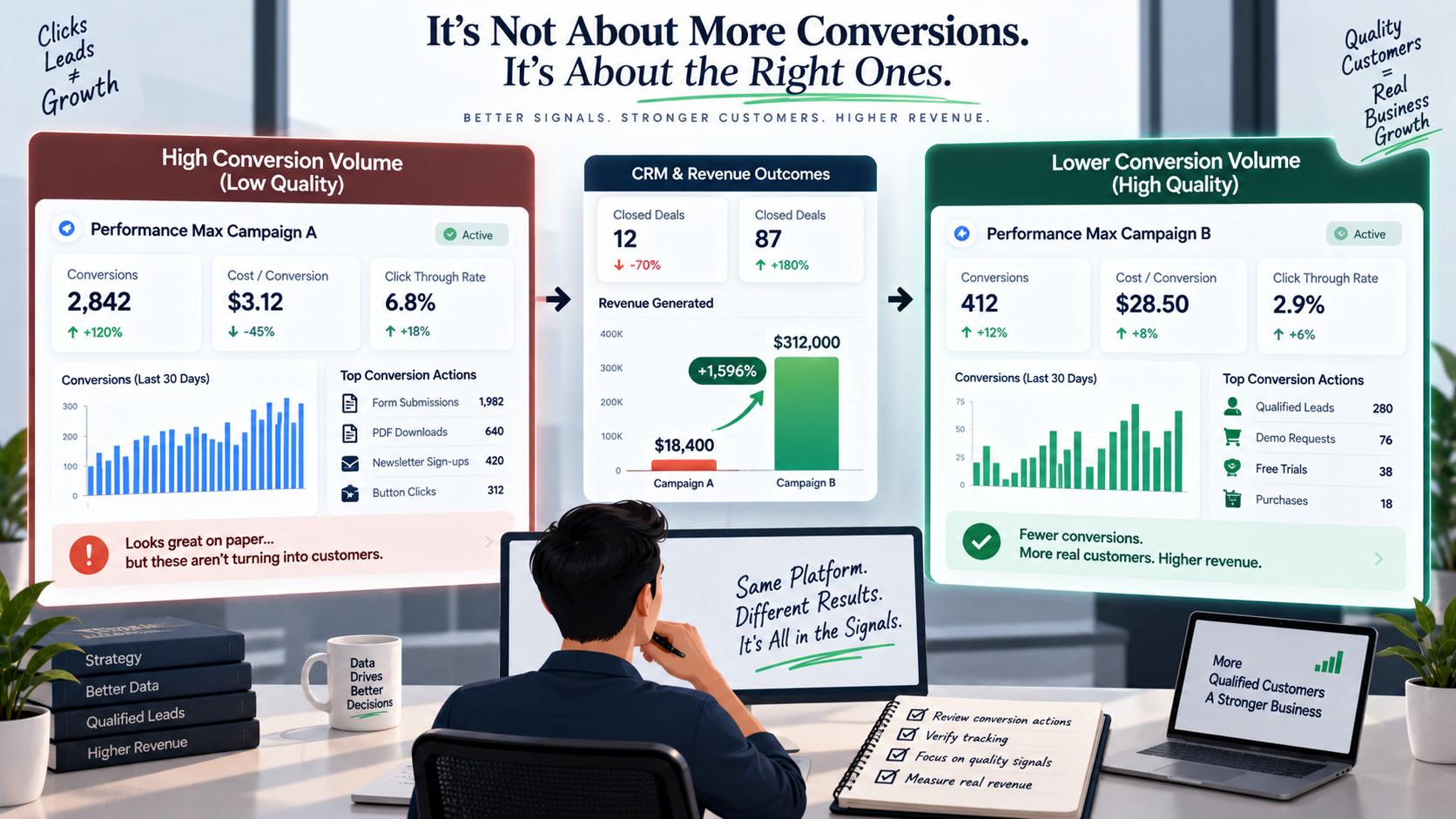
One of the biggest mistakes advertisers make is judging campaign success by conversion volume alone.
Imagine these two campaigns:
Campaign A
- 120 form submissions
- $35 cost per conversion
- 3 closed sales
Campaign B
- 45 form submissions
- $90 cost per conversion
- 15 closed sales
Campaign A looks great inside Google Ads.
But Campaign B is the one actually driving more revenue for your business.
Performance Max doesn't automatically know which campaign is more profitable. It only knows which conversion actions you've defined as valuable.
That’s why you should always evaluate campaign performance using your CRM data alongside Google Ads metrics. It’s the only way to know if your campaigns are really driving growth.
Instead of asking:
"How many conversions did we generate?"
Ask:
"How many qualified customers did those conversions produce?"
Shifting your focus from conversion quantity to conversion quality is what separates high-performing Performance Max campaigns from the rest.
Best Practices After a Website Migration
Most Performance Max issues start right after a website migration—not because your campaign changed, but because your conversion data did.
Before assuming Google's automation is at fault, complete these post-migration checks:
- Verify every important conversion action manually.
- Confirm Google Ads and GA4 are recording the same events.
- Check that Enhanced Conversions are still active.
- Test cross-domain tracking if customers move between multiple domains.
- Compare qualified leads and revenue before and after the migration.
- Avoid changing your budgets, bidding strategies, and conversion settings all at once.
Introducing multiple changes simultaneously makes it difficult to identify the true cause of performance declines.
Performance Max Doesn't Have a Bidding Problem — It Has a Data Problem
When Performance Max starts chasing the wrong conversions, it’s easy to blame Google’s automation.
But in reality, the algorithm is just doing what it was designed to do.
It follows the signals you give it.
If those signals get thrown off after a tracking update, domain migration, GA4 setup, or CRM integration, Google’s machine learning will confidently optimize for those new patterns—even if they don’t match your real business goals.
That’s why the most successful brands focus on measurement before they start optimizing.
Reliable conversion tracking, properly set up conversion actions, and high-quality first-party data give Performance Max what it needs to find valuable customers—not just generate more conversions.
Remember, automation is only as smart as the data you feed it.
Ready to Get Performance Max Back on Track?
If your campaigns started generating low-quality leads after a website migration, tracking update, or domain change, the problem may not be your ads—it may be the signals guiding Google's automation.
At 253 Media, we help businesses uncover tracking issues, audit conversion data, and build Performance Max campaigns that optimize for real business outcomes—not misleading metrics. Our approach keeps your campaigns focused on growth, not just activity.
Whether you need a Google Ads health check, a post-migration tracking audit, or a long-term PPC strategy, our team can help you trust your data again and get your campaigns performing at their best.
Ready to improve your lead quality and get more from your ad spend? Schedule a Performance Max Audit with 253 Media and find out what’s really driving your campaign results.
FAQs
Q. Why did my Performance Max campaign performance drop after a website migration?
A. There are several important areas that can be affected by website migrations: conversion tracking, Enhanced Conversions, cross-domain attribution, and Google Tag Manager. Performance Max will begin optimizing for lower-quality users if it has inaccurate or incomplete conversion data.
Q. Can incorrect conversion tracking affect Smart Bidding?
A. Yes. Smart Bidding depends on conversion signals to decide how much to bid. If those signals are wrong, repeated, or represent low-value actions, Google's automation will focus on those outcomes of your actual business goals.
Q. Should I delete my Performance Max campaign and start over?
A. Not always. In many cases, fixing your conversion tracking and giving the campaign time to adjust is better than starting from scratch. Restarting should usually be considered only after making sure the old data isn't reliable enough to help with future decisions.
Q. What are Primary and Secondary conversions in Google Ads?
A. Primary conversions are the actions Google uses for automated bidding and campaign optimization, such as purchases or qualified lead submissions.
Secondary conversions are only considered for reporting purposes. This can be signups for a newsletter, downloading PDFs, or watching videos. Separating them makes it easier for Performance Max to focus on meaningful business results.
Q. How long does Performance Max take to recover after fixing tracking issues?
A. Recovery time will be affected by conversion volume, campaign spend, and tracking changes. Results might show up within a couple of days of making the changes, but campaigns typically require two to six weeks of good conversion data to fine-tune machine learning to the corrected signals.