Meta Advantage+ Performance Dropping? How to Fix Creative Fatigue, Rising CPMs, and Falling ROAS
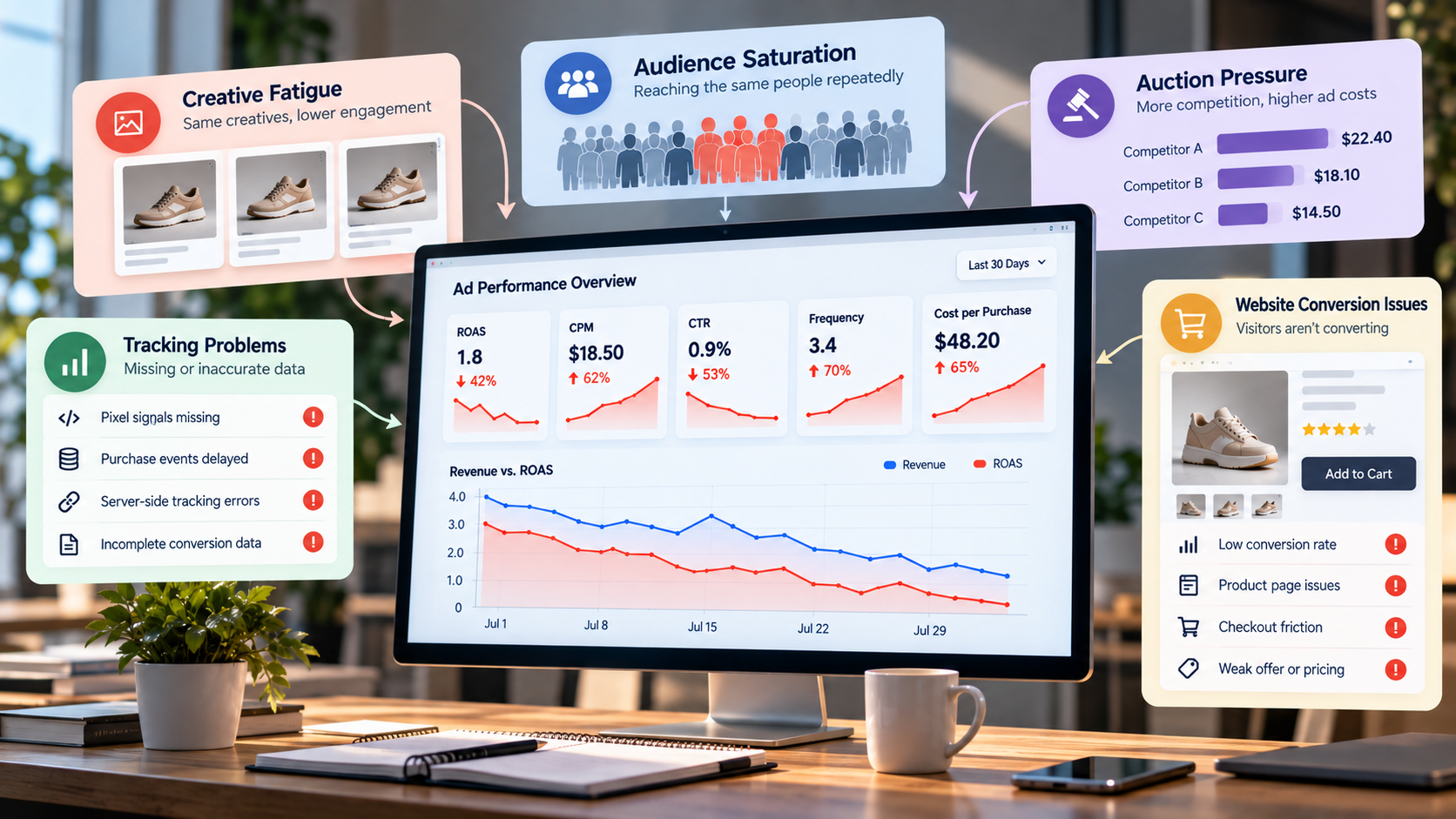
Your Meta Advantage+ campaign was profitable last month. Now the same campaign is spending at a similar pace, but CPMs are climbing, CTR is falling, and ROAS is moving in the wrong direction.
Sound familiar?
If your Meta Advantage+ performance is dropping, don't panic or rush to rebuild your campaigns from scratch. Most performance declines come down to a handful of fixable issues: creative fatigue, audience saturation, auction pressure, scaling too quickly, tracking errors, or post-click problems.
The real challenge is pinpointing the exact issue before making changes that could hurt your results even more.
For ecommerce brands, especially on Shopify, your ad account and your website performance are tightly linked. If your conversion rate drops, it may look like an ad problem, but the real culprit is often your product page, offer, catalog, checkout, or tracking setup.
This guide provides a practical framework to diagnose and resolve significant revenue blockers, ensuring profitable growth for your Advantage+ campaigns through a repeatable system.
Why Is Your Advantage+ Campaign Underperforming?
When an Advantage+ campaign suddenly starts producing worse results, don't assume Meta's algorithm has “stopped working.”
Look at the sequence of changes.
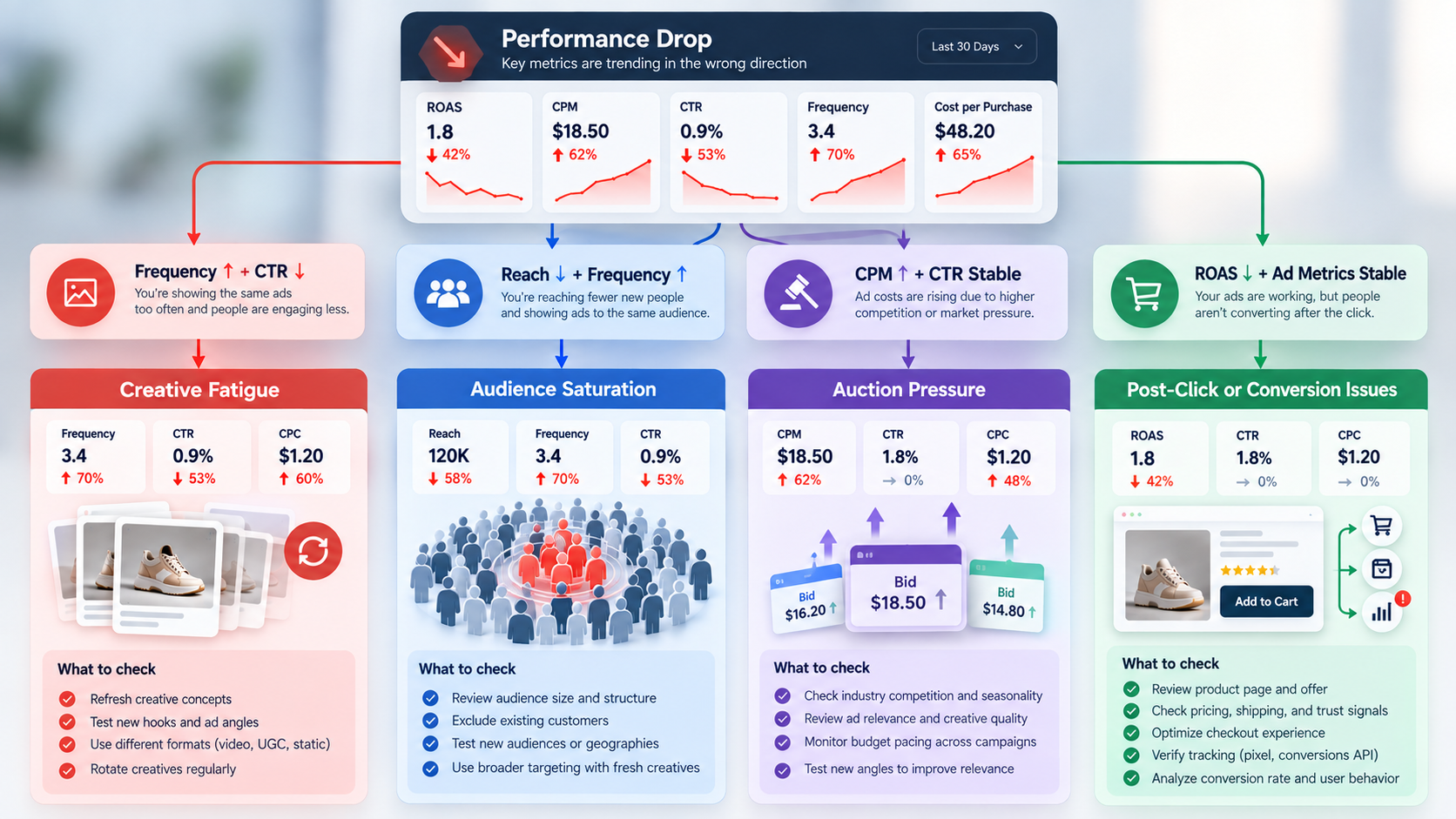
Rising frequency + falling CTR often points to creative fatigue.
Declining reach + rising frequency can indicate audience saturation.
CPM rising sharply while CTR remains relatively stable may indicate increased auction competition or broader market pressure.
ROAS falling while CPM and CTR remain fairly stable points more toward conversion, offer, landing page, product, or tracking issues.
So the first step is not to launch a new campaign.
Instead, follow this order: diagnose, isolate the issue, fix it, measure the impact, then scale up what works.
What Does “Performance Dropping” Actually Look Like?
A campaign rarely goes from excellent to terrible for no reason.
Usually, the warning signs appear gradually.
You may notice:
- ROAS declining over 7–14 days
- Cost per purchase increasing
- CPM rising
- Frequency increasing
- CTR declining
- CPC increasing
- Conversion rate falling
- Revenue increasing at a slower pace than ad spend
- Creatives once performed well now underperforming
- Campaign performance becoming increasingly volatile
A single bad day doesn't mean your campaign is broken.
Meta performance naturally fluctuates because of auction conditions, demand, competition, creative delivery, seasonality, and conversion volume.
The more important distinction is between short-term volatility and sustained deterioration.
If performance is slightly worse for three days, avoid making five major changes at once.
If performance has deteriorated consistently for two or more weeks, investigate.
Watch the sequence, not just the final ROAS
ROAS is an outcome metric.
It tells you something is wrong, but it doesn't necessarily tell you why.
Consider this pattern:
Frequency ↑ → CTR ↓ → CPC ↑ → purchases ↓ → ROAS ↓
That's a very different problem from:
CPM ↑ → CTR stable → CPC ↑ → conversion rate stable
The first pattern suggests creative or audience issues.
The second may be tied more to auction pressure.
If you can spot these patterns, you'll save yourself a lot of costly trial and error.
Diagnostic Checklist: Is It Creative Fatigue, Audience Exhaustion, or Something Else?
Before changing your campaign structure, pull the last 28–90 days of data in Ads Manager.
Break performance down by campaign, ad set, and ad where appropriate.
Look at:
- CPM
- Frequency
- CTR
- Link CTR
- CPC
- Cost per purchase/result
- Conversion rate
- ROAS
- Spend
- Purchases
- Revenue
Then use this simple framework.
This diagnostic step is crucial for protecting your ad spend.
Don't solve a tracking problem with new creatives.
Don't solve creative fatigue by rebuilding your entire account.
Don't solve a pricing problem by increasing the budget.
Focus on fixing the real bottleneck that's holding back your results.
Fix #1: Build a Creative Refresh System That Beats Fatigue
For many Advantage+ advertisers, creative is where performance first starts to deteriorate.
Your campaign may have found an audience that responds well to a particular message. Meta increases delivery to that creative, users see it repeatedly, and eventually its ability to generate attention or action declines.
A solution is not just:
“Create another variation of the same ad.”
You require fresh concepts, perspectives, and hooks.
What should you refresh?
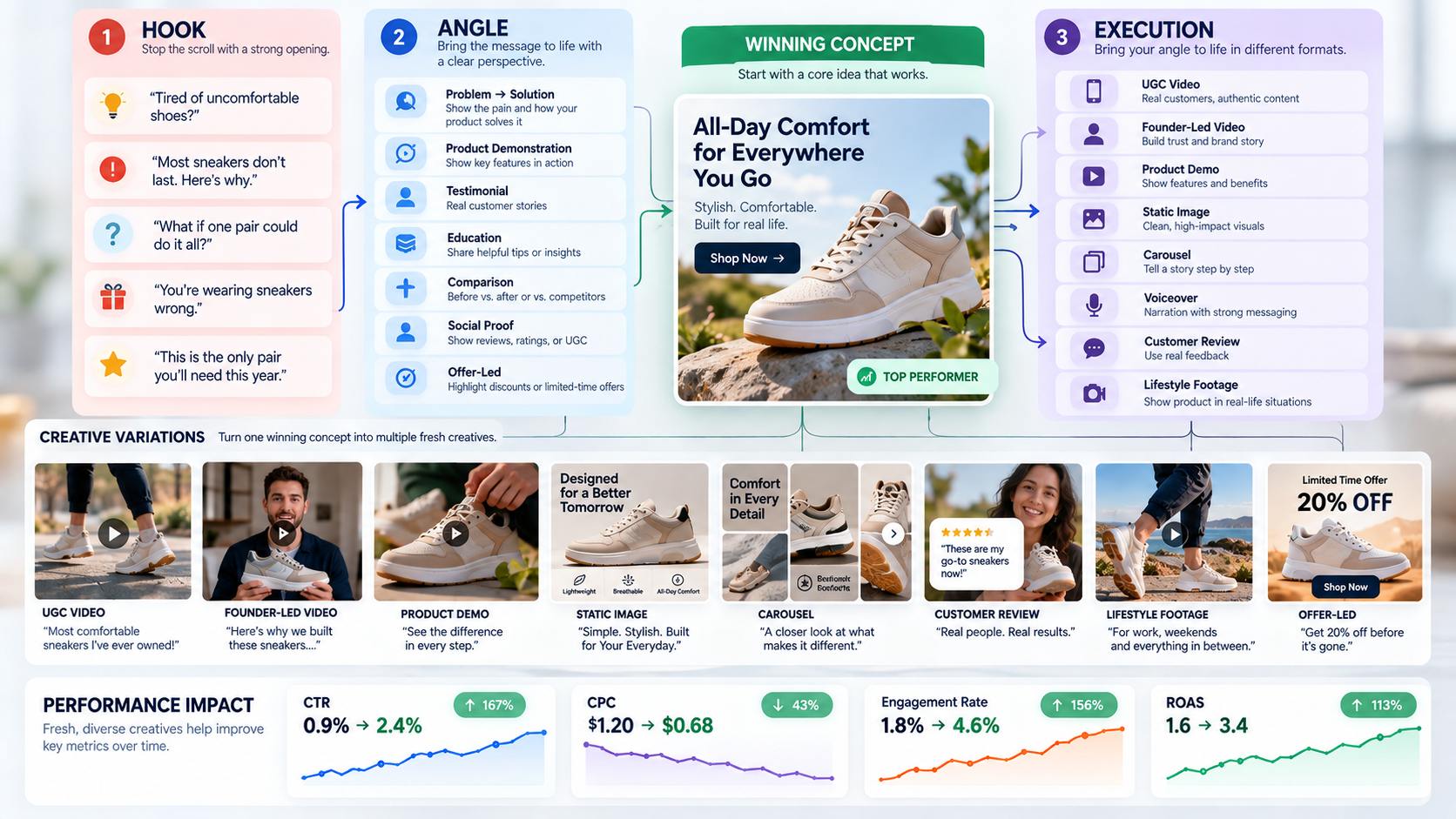
Think in layers.
Layer 1: Hook
Change the first few seconds or opening line.
For example:
Problem hook:
“Still dealing with ___?”
Outcome hook:
“Here's how we helped ___ achieve ___.”
Curiosity hook:
“Most people don't use this the right way.”
Proof hook:
“We tested three versions. This one won.”
Layer 2: Angle
Shift the reason someone should care.
Some possible ecommerce angles include:
- Problem/solution
- Product demonstration
- Before/after
- Customer testimonial
- Founder story
- Education
- Comparison
- Objection handling
- Social proof
- Offer-led
- UGC
- Product benefits
Layer 3: Execution
Then change how the idea is presented:
- UGC
- Founder-led video
- Product demo
- Static image
- Carousel
- Voiceover
- Customer review
- Lifestyle footage
This creates genuine creative diversity, not five ads that are essentially the same ad with different background music.
How Often Should You Refresh Advantage+ Creatives?
No universal refresh date applies to every account.
Your refresh cadence should respond to performance and spend, not an arbitrary calendar.
That said, a practical operating system for many ecommerce brands is to introduce 4–6 new creative concepts every 1–2 weeks, particularly when an account has enough spend to generate meaningful data.
Here's how a practical workflow goes:
Launch
Don't go all out with one “hero” ad; go with a creative pool.
Days 7–14
Check spend, CTR, cost per purchase, ROAS, and level of creative engagement.
Identify winners
Look for concepts that are generating efficient traffic and purchases.
Identify fatigued assets
If an ad has consumed meaningful spend and its efficiency is deteriorating, consider reducing or pausing it.
Create “siblings” of winners
Don't throw away the winning idea.
Keep the core angle but change:
- Hook
- Opening shot
- Creator
- Demonstration
- Testimonial
- Format
- Copy
This sets up a creative testing system you can scale as your business grows.
Keep profitable winners running
One common mistake is pausing a good-performing ad simply because it's old.
Age isn't the problem.
Declining performance is the problem.
If an asset keeps hitting your allowable cost per purchase or ROAS target, there's no reason to kill it just because it's been running for several weeks.
Key creative metrics to watch before ROAS drops
ROAS is often a lagging indicator.
By the time ROAS collapses, the underlying creative problem may have been visible for days.
Watch:
- Thumb-stop/initial attention
- Video hold rate
- Link CTR
- CPC
- Landing-page view rate
- Add-to-cart rate
- Purchase conversion rate
Here's a helpful pattern to follow:
Attention declines → CTR declines → CPC rises → fewer qualified visitors → purchases decline → ROAS falls.
If you catch the problem early, recovery can be much easier.
Fix #2: Scale Budgets Without Destroying ROAS
Sometimes the problem isn't fatigue.
It's scaling.
A campaign generating strong returns at $1,000/day may not generate the same returns at $5,000/day.
As spending increases, Meta has to find additional opportunities in the auction.
That can change:
- CPM
- Audience mix
- Conversion efficiency
- Creative delivery
- Marginal acquisition cost
So don't treat your current ROAS as a guarantee at a higher budget.
Use controlled budget increases
As a good rule of thumb, avoid big budget increases unless the campaign is clearly outperforming your targets.
Instead, consider smaller increases—often around 10–20%—when the campaign has demonstrated stable economics.
For example:
If your target ROAS is 3.0 and the campaign has consistently produced 3.5–4.0, you have more room to scale than if it is barely producing 3.0.
After increasing spend, give the campaign enough time to produce meaningful data before making another major change.
Don't scale while things are unstable.
Be especially cautious when:
- CPM has suddenly spiked
- Frequency is already high
- Creative inventory is thin
- Conversion rate has declined
- Your website is experiencing problems
- Stock is limited
- A major seasonal event is distorting demand
If your funnel isn't working, scaling just burns more budget without fixing the real issue.
Should You Duplicate an Advantage+ Campaign to Scale?
The process of duplicating campaigns can be tempting.
You see a profitable ASC and think:
“I'll duplicate it and double the budget.”
But creating additional campaigns can introduce unnecessary competition, audience overlap, fragmented learning, and more complicated reporting.
If your current Advantage+ campaign is working, it's often easier and more effective to increase its budget than to duplicate campaigns and complicate your account.
The objective isn't to create more campaigns.
The real goal is to drive more profitable conversions, not just more campaigns.
For many accounts, consolidation makes management easier and gives the system more budget density.
Fix #3: Review Audience and Campaign Structure
Advantage+ is designed to automate much of the audience and delivery process.
That means over-segmenting the account can work against your goals.
If you create many small campaigns or ad sets targeting similar people, you may spread spend too thinly and make it harder to accumulate useful conversion signals.
Think broader, not more complicated
For many ecommerce brands, broad targeting combined with strong creative gives Meta more room to identify likely buyers.
Instead of creating separate structures for every:
- Age group
- Interest
- City
- Demographic
- Product preference
Consider whether those segments genuinely need separate campaigns.
If the products, economics, and customer intent are similar, consolidation may work better.
Watch audience overlap
You only make your account more complex when several campaigns essentially target the same people.
Ask:
- Are campaigns targeting substantially similar audiences?
- Are budgets fragmented?
- Does each campaign have enough conversion volume?
- Are separate campaigns actually producing incremental results?
- Could these audiences be consolidated?
The answer won't always be “merge everything.”
But every additional campaign should have a reason to exist.
Don't Forget Existing Customers
One issue for ecommerce brands is allowing paid acquisition campaigns to spend too heavily on people who already purchased.
Existing customers can be valuable.
But if your objective is new-customer acquisition, you need visibility into how much budget you spend on returning buyers.
Considering your setup and business model, think about:
- Customer exclusions
- Existing-customer audience controls
- New-vs-returning customer reporting
- Appropriate customer budget caps
The right approach depends on your campaign objective and Meta's current account capabilities.
The key is to track exactly who you're acquiring so you know your ad spend is driving real growth.
A 4.0 ROAS doesn't mean much if most of your revenue is from repeat buyers who would have purchased without ads.
Fix #4: Your Ads May Not Be the Problem
This is where many performance marketers stop too early.
Suppose:
- CPM is normal
- CTR is normal
- CPC is normal
- Traffic volume is healthy
But ROAS has fallen.
What changed after the click?
Your advertising campaign could be working perfectly while the website is converting worse.
Check the post-click experience
For Shopify brands, review:
Product page
- Is the product clearly explained?
- Are images high quality?
- Is the value proposition obvious?
- Are reviews visible?
- Is pricing competitive?
- Are shipping costs clear?
- Are size/variant choices easy?
Mobile experience
Most ecommerce ad traffic can be heavily mobile-weighted.
Check:
- Page speed
- Navigation
- Image loading
- Sticky add-to-cart
- Checkout friction
- Pop-ups
- Mobile readability
Offer
Your ad might promise something the website doesn't actually deliver.
Test:
- Bundles
- Discounts
- Free shipping
- Guarantees
- Quantity offers
- Limited-time promotions
- Subscription incentives
An algorithm change isn't always what makes ROAS fall; sometimes the offer is no longer compelling.
Check Your Tracking Before You Blame Meta
Even a perfectly healthy campaign can appear unhealthy because of a tracking issue.
Review:
- Meta Pixel
- Conversions API
- Event matching
- Purchase events
- Value
- Currency
- Deduplication
- Attribution settings
- Shopify integration
If purchases aren't reported correctly, Meta gets less reliable feedback on which users and creatives drive results.
At the same time, your Ads Manager ROAS may appear lower than your actual business revenue.
Compare Meta reporting against:
- Shopify revenue
- GA4
- CRM data
- Backend order data
Expecting perfect alignment across all platforms is unrealistic. Instead, focus on significant, unexplainable discrepancies.
For example, if Meta revenue dropped 40% while Shopify sales stayed relatively stable, investigate your measurement methods before reducing spend.
A Shopify-Specific Advantage+ Performance Checklist
For Shopify advertisers, the campaign doesn't exist separately from the store.
When results start to decline, take a look at the whole journey.
Ad → Product → Landing page → Cart → Checkout → Purchase
Check:
Catalog
- Product titles
- Product images
- Check product availability
- Variants
- Pricing structure
- Accuracy of the product feed
Product page
- Mobile UX
- Reviews
- Benefits
- Product information
- Shipping
- Returns
- Trust signals
Checkout
- Payment methods
- Errors
- Unexpected costs
- Coupon functionality
- Mobile experience
Measurement
- Pixel
- CAPI
- Purchase event
- Revenue
- Currency
- Deduplication
This is why a paid media audit and Shopify optimization audit often need to work together.
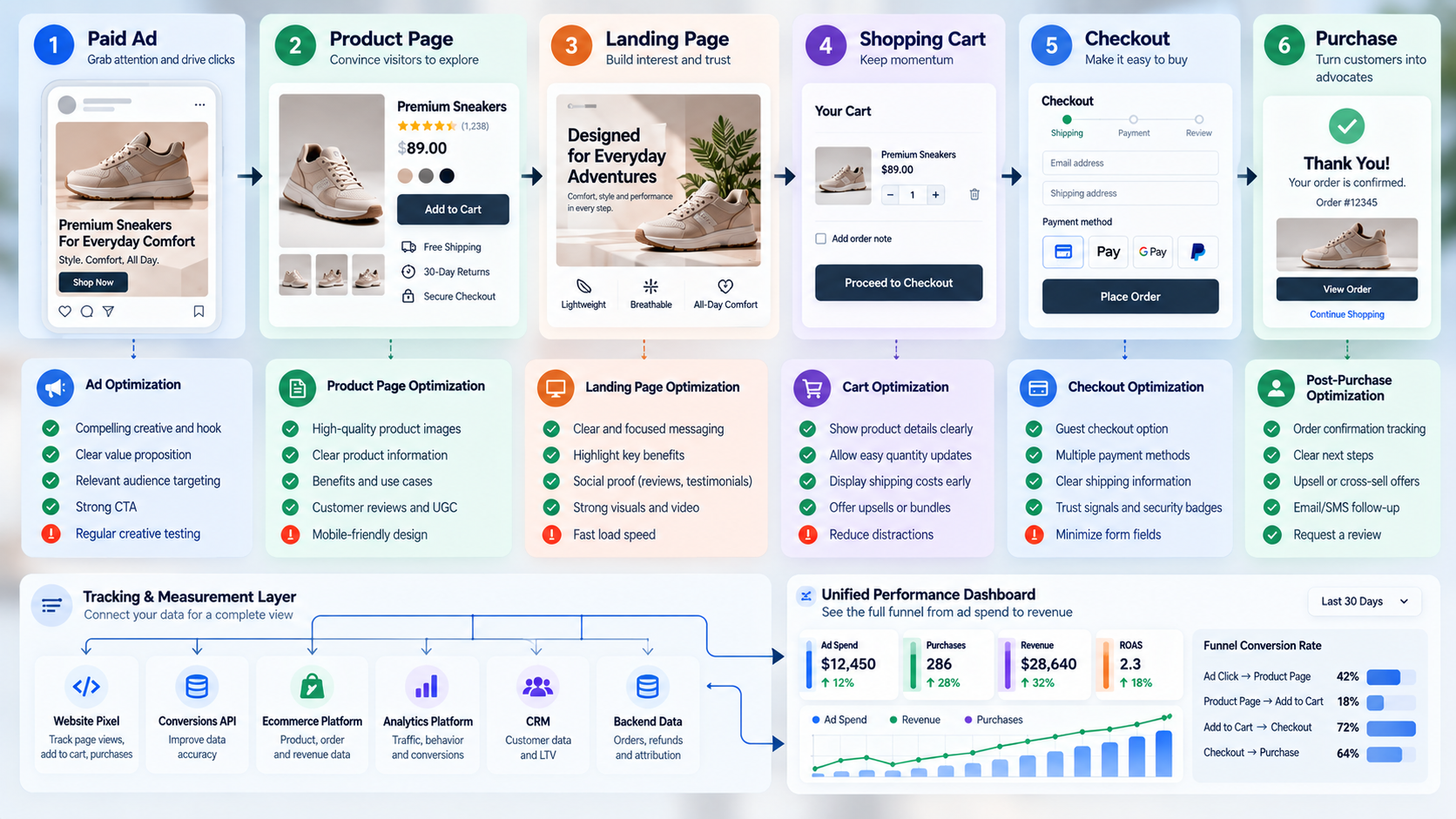
The Real Advantage Is a Better Testing System
When Meta Advantage+ performance drops, the temptation is to blame the algorithm.
But most of the variables that determine whether your campaign recovers are still within your control.
You control your:
- Creative pipeline
- Offers
- Product pages
- Catalog
- Tracking
- Budget discipline
- Testing process
- Campaign structure
- Measurement
That's the good news for your business.
Because you don't need to predict exactly what Meta will do next.
You need a system that spots problems early and lets you respond quickly to protect your revenue.
Start with the data.
If frequency is rising and CTR is falling, prioritize creative.
If CPM is rising while engagement remains healthy, investigate auction and seasonal factors.
If ROAS is falling while ad metrics look stable, investigate your website, offer, and conversion rate.
If reported performance suddenly disagrees with Shopify revenue, validate your tracking.
If multiple campaigns target similar audiences, evaluate whether your structure has become unnecessarily fragmented.
Don't let falling ROAS drain your ad budget.
If your Advantage+ campaigns were working and suddenly aren't, you don't necessarily need a complete account rebuild.
You need to pinpoint what changed, why it changed, and which lever will get your results back on track.
That's where a structured performance audit can save you time, money, and lost revenue compared to more guesswork.
At 253 Media, our goal isn't just to point out that your ROAS is down. We connect the dots between creative fatigue, CPMs, audience delivery, campaign structure, your Shopify experience, tracking, and your real business revenue.
Ready to find out what's really hurting your Meta performance? Book a free Meta Advantage+ performance audit with 253 Media and get a clear, prioritized action plan for your campaigns, creatives, tracking, Shopify funnel, and scaling strategy.
Don't respond to falling ROAS by blindly spending more. Diagnose the constraint, fix it, and build a system that keeps your next campaign from reaching the same point.