Why Is My Website Traffic Dropping? A Step-by-Step SEO Audit for Google Updates and AI Overviews
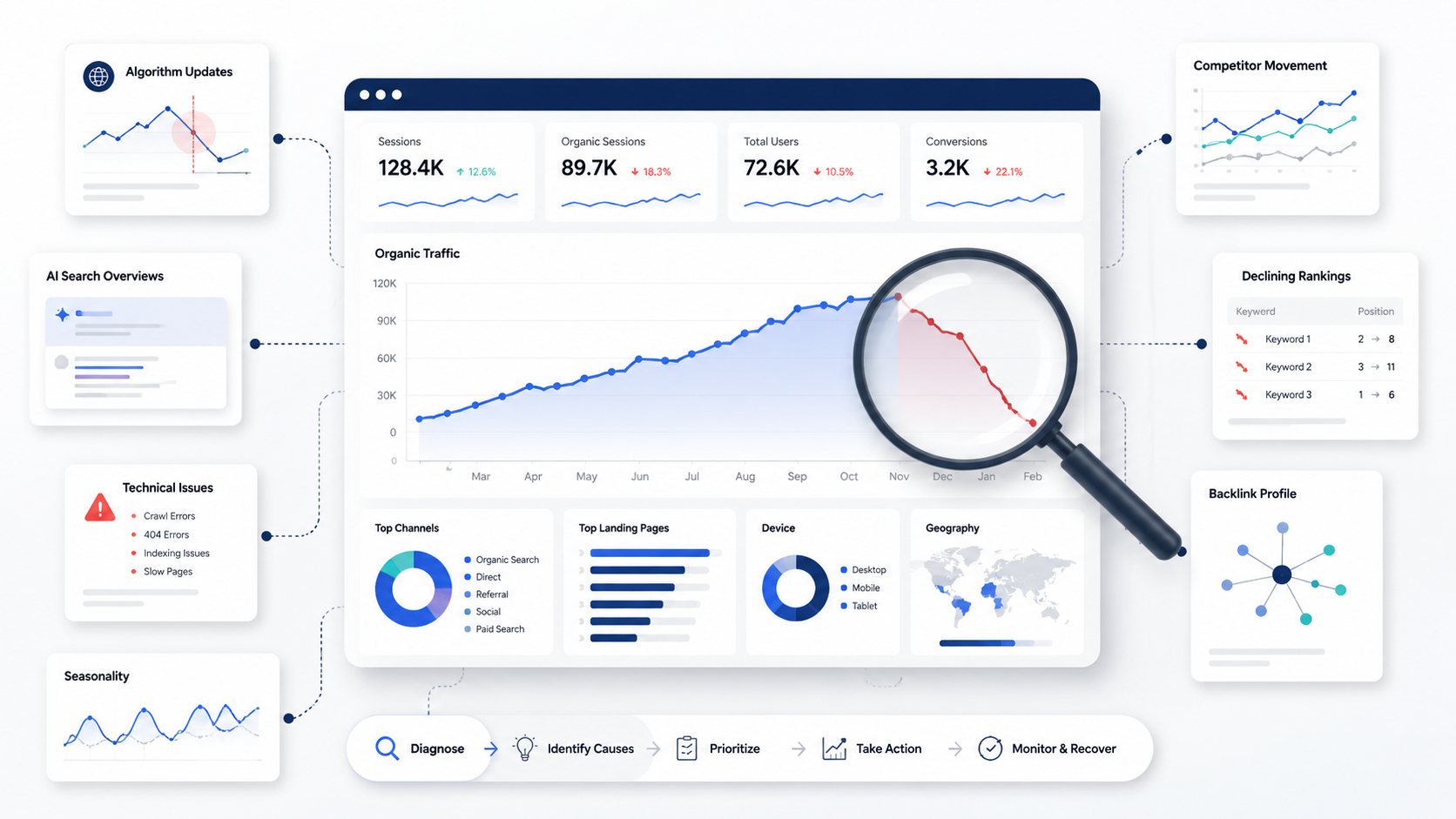
Have you logged into Google Analytics only to discover that your website traffic has suddenly dived?
It’s a stressful moment for any business owner. One day, your organic traffic is steady; the next, it’s down by 30%, 50%, or more. The instinct is to panic and maybe even rush to redesign or rewrite your entire site. But before you make any big moves, pause and get the facts.
If your website traffic suddenly drops, it doesn't necessarily mean your SEO strategy isn't working. Sometimes this drop in traffic is due to a Google Core Update, new competitors, technical errors, seasonal changes, or Google's AI Overviews changing how people interact with search results.
Don’t guess. Investigate. The right diagnosis is what protects your leads and revenue.
This guide offers a step-by-step SEO audit to help you find why your website traffic is dropping, implement high-impact fixes, and create a recovery plan to restore your visibility and conversions.
Is Your Traffic Drop Real or Seasonal?
Before assuming Google has penalized your website, confirm whether the decline is actually unusual.
Many businesses experience predictable fluctuations in search traffic throughout the year. For example, a landscaping company may see lower search demand during winter, while an online retailer could experience an increase during the holiday shopping season.
Knowing whether your traffic loss is seasonal or a real problem saves you from wasting time and budget on fixes you don’t need.
Compare Year-Over-Year Data
Instead of comparing this month to last month, compare it to the same period last year.
This gives you a much clearer picture because it accounts for seasonal buying patterns, holidays, and business trends.
For example:
- A travel website may naturally see fewer searches after summer.
- A tax consultancy will almost always experience a decline after tax season ends.
- An educational institution may notice spikes before admission periods.
If your traffic follows the same pattern every year, it’s likely just seasonality—not an SEO issue. That means your leads and sales should bounce back as demand returns.
Look Beyond Overall Traffic
A 40% decline in traffic sounds alarming. Where did that loss actually happen?
Break your traffic down by:
- Organic Search
- Direct Traffic
- Referral Traffic
- Paid Search
- Social Media
If your organic traffic is down, SEO is likely the problem. Finding the source of the problem helps you focus your efforts where they will have the most impact.
Compare Branded vs. Non-Branded Searches
Branded searches have your business name, while non-branded searches are generic queries people use to find businesses like yours.
For example:
- Branded: "253 Media"
- Non-branded: "SEO agency for small businesses"
If branded traffic is constant but non-branded traffic drops, you’re likely losing ground on competitive keywords, meaning fewer new customers are finding you.
Check Conversion Trends
Traffic numbers don't tell the whole story.
Ask yourself these questions:
- Are leads declining?
- Are you getting phone calls?
- Are you making sales online?
- Is your business making money?
Sometimes, you’ll see fewer visitors but higher-quality traffic that actually converts better. In that case, a traffic drop isn’t always bad for your bottom line.
Always look at business performance, including leads, sales, and revenue, alongside your traffic numbers.
Check Whether Google Released an Algorithm Update
If your traffic dropped suddenly overnight, Google may have updated its search algorithm.
Google rolls out several major updates each year to improve search quality. These updates can considerably affect rankings, even for websites that have followed SEO best practices.
The first step is to compare the date of your traffic decline with Google's announced updates.
If they correspond, you're likely dealing with an algorithm-related impact rather than a technical issue.
Common Google Updates That Affect Rankings
Core Updates
Core Updates evaluate the overall quality and relevance of content.
These updates commonly reward websites that give valuable, trustworthy, and comprehensive information while reducing visibility for thin, outdated, or less helpful content.
Websites commonly affected include:
- Blogs
- E-commerce stores
- Local businesses
- Healthcare websites
- Financial websites
Spam Updates
Google continuously improves its ability to detect manipulative SEO practices.
Your rankings could suffer if your website relies on:
- Keyword stuffing
- Purchased backlinks
- Cloaking
- Hidden text
- Automatically generated content
Helpful Content Updates
Google increasingly rewards content created for people—not search engines.
Ask yourself:
- Does this page genuinely answer the searcher's question?
- Is it more useful than competing pages?
- Would someone bookmark or share it?
If the answer is no, Google may gradually reduce its visibility.
Don't Make Drastic Changes Immediately
One of the biggest mistakes website owners make after a Google update is changing everything at once.
Avoid:
- Deleting large amounts of content
- Rewriting every page overnight
- Updating URLs unnecessarily
- Buying backlinks to recover rankings quickly
Instead, diagnose the actual cause before taking action.
SEO recovery is a strategic process. Rushing only puts your revenue at risk.
How AI Overviews May Be Reducing Your Organic Clicks
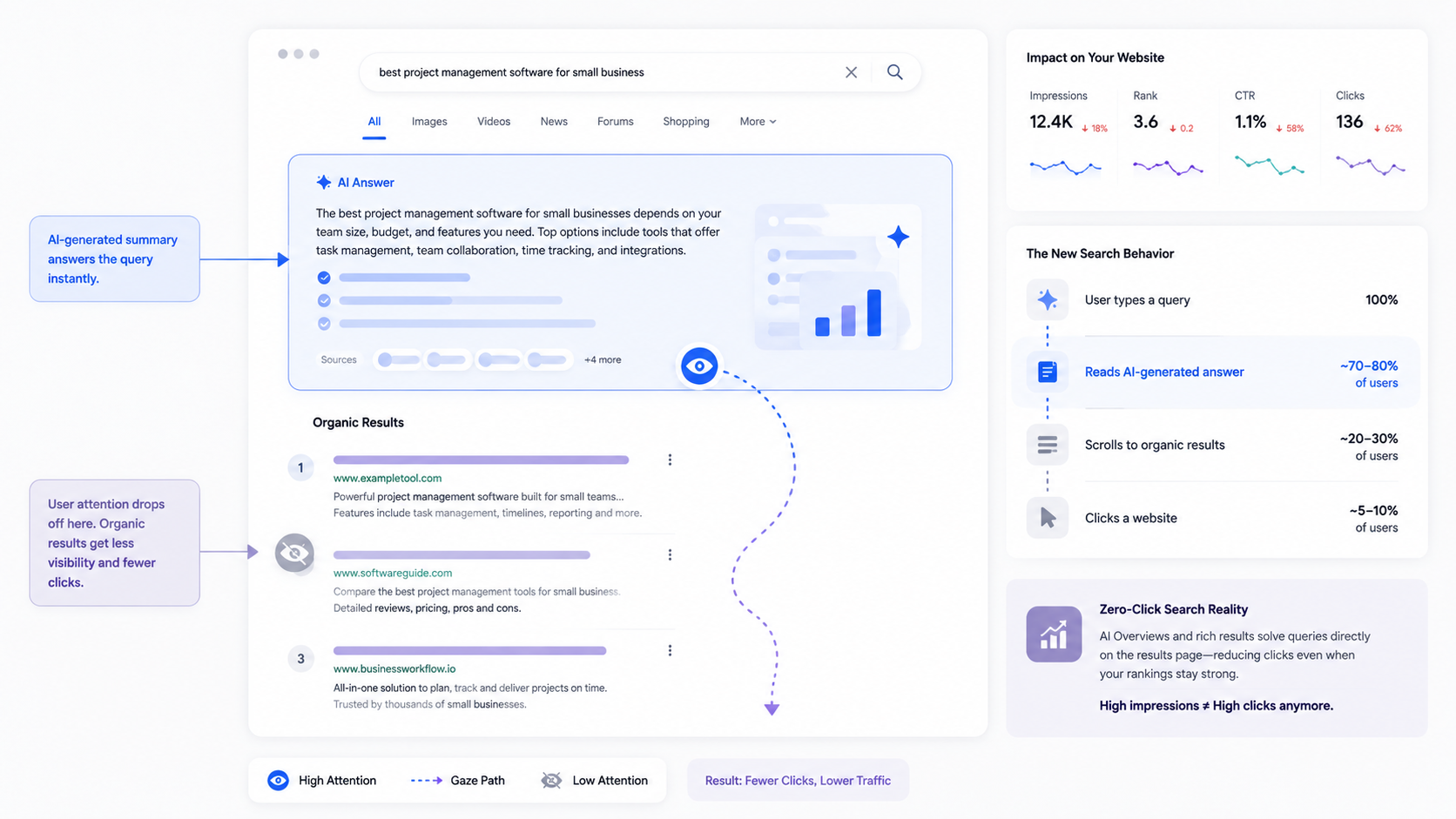
Google Search is evolving faster than ever, and one of the biggest changes is the introduction of AI Overviews.
Instead of displaying only traditional search results, Google can now generate AI-powered summaries at the top of the page for many informational searches.
While this improves the user experience, it also changes how people interact with search results, and it may explain why your website traffic is dropping even if your rankings haven't changed.
Ranking #1 Doesn't Guarantee the Same Number of Clicks
Imagine your website ranks first for a question like:
"How do I improve local SEO?"
Previously, users would click your article to find the answer.
Now, Google may display an AI-generated summary that answers the question immediately, pulling information from multiple trusted sources. Many users find what they're looking for without even having to click on a website.
This is known as a zero-click search, and it's becoming increasingly common.
As a result, you may notice:
- Stable keyword rankings
- Similar search impressions
- Lower click-through rates (CTR)
- Declining organic traffic
In other words, your rankings may be stable, but user behavior has shifted. That’s why your traffic and leads can drop even when you’re still showing up in search.
Which Content Is Most Affected?
AI Overviews tend to appear for informational searches, especially those that ask questions or find explanations.
Examples:
- What is technical SEO?
- How to optimize a website for Google?
- Why is my website traffic dropping?
Content that duplicates information found elsewhere is more likely to lose clicks, as Google's AI can easily summarize it.
On the other hand, pages that include original insights, firsthand experience, case studies, unique data, or expert analysis are more difficult to replace with an AI-generated overview.
How to Stay Visible in the Age of AI Search
Do not try to compete with AI. Just focus on producing content that goes beyond generic answers.
Just add-
- Original research and statistics
- Real client examples
- Step-by-step walkthroughs
- Industry-specific advice
- Expert commentary
- Practical templates and checklists
The more unique value you deliver, the more likely users are to click through—even when AI Overviews show up first. This will help you protect your traffic and keep conversions coming in.
Step 1: Review Google Search Console
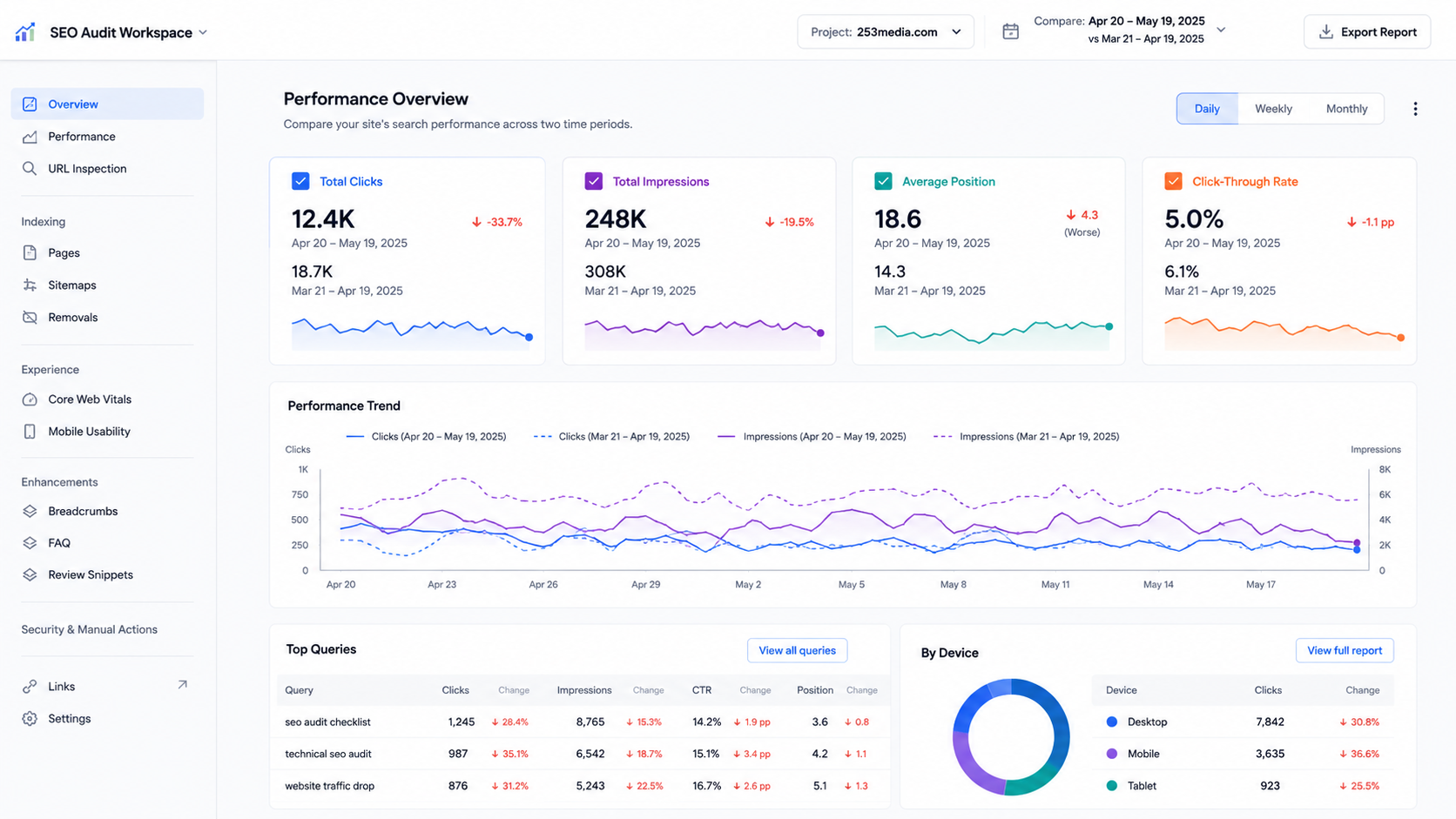
If you're only checking Google Analytics, you're missing half the story.
Google Analytics tells you what happened — your traffic dropped. Google Search Console tells you why, so you can fix it and recover lost leads.
Start by opening the Performance report and comparing the last 28 or 90 days with the previous period.
Pay close attention to four key metrics:
- Clicks
- Impressions
- Average Position
- Click-Through Rate (CTR)
Every metric provides a unique insight into your visibility, engagement, and possible conversions.
Scenario 1: Clicks Are Down, but Impressions Are Stable
This indicates that your pages continue to show up in search results, with reduced click-through rates.
Possible reasons include:
- AI Overviews answer the question before people go to your site.
- Highly engaging title tags and meta descriptions from competitors.
- Rich results or featured snippets push your listing lower on the page.
Quick Fixes:
- Change page titles to focus more on the benefits.
- Improve meta descriptions by adding clear value propositions.
- Add structured data where appropriate to increase SERP visibility.
Scenario 2: Impressions Have Dropped
When impressions drop, it means that Google is displaying your pages less often.
Common causes include:
- Keyword rankings have fallen.
- Search demand has changed.
- Pages have been deindexed.
- Competitors are outranking you.
What to do:
- Identify which keywords lost visibility.
- Refresh outdated content.
- In Search Console, check the status of indexing.
- Analyze competitor content for those keywords.
Scenario 3: Rankings Dropped Across Multiple Pages
If several pages see a drop in their rankings at the same time, some possible reasons could be:
- A Google Core Update
- Technical SEO issues
- Site migration errors
- Major website redesign
- Crawl or indexing problems
Try to identify problems across the site before fixing individual pages. That’s where you’ll find the biggest opportunities to recover lost traffic and revenue.
Check the Pages Report
In Search Console, use Pages to find indexing issues.
Look for warnings such as:
- Crawled – Currently Not Indexed
- Discovered – Currently Not Indexed
- Duplicate Without User-Selected Canonical
- Soft 404 Errors
- Blocked by Robots.txt
If your key pages aren’t indexed, they won’t bring in any organic traffic—no matter how well you’ve optimized them. That’s a lost opportunity for leads and sales.
Review Search Queries
Sort queries by largest decrease in clicks. You need to ask yourself some questions:
- Which keywords had the highest traffic loss?
- Are informational pages affected more than commercial pages?
- Has search intent changed?
- Are competitors offering more exclusive content?
Patterns uncover the real problem faster than isolated metrics.
Step 2: Audit Technical SEO Issues
Even the best content can't rank if search engines struggle to crawl or understand your website.
Technical SEO forms the foundation of organic visibility. A small technical issue can affect hundreds of pages without you realizing it.
Here's what to check.
Crawl Errors
Search engines need to be able to look at your pages.
You can use Search Console or a website crawler to find problems.
- Broken links
- Server errors
- Redirect loops
- Missing pages
- Crawl anomalies
Broken pages disappoint users, waste Google’s crawl budget, and can cost you both rankings and conversions.
Robots.txt and Noindex Tags
Sometimes a website accidentally blocks Google from crawling its pages.
This often happens after:
- Website redesigns
- CMS migrations
- Development staging environments
Review your robots.txt file and page-level meta tags to ensure valuable pages remain crawlable.
XML Sitemap
Your sitemap helps search engines discover new and updated content.
Check whether:
- The sitemap includes all important pages.
- Removed pages have been deleted.
- URLs return a 200 status code.
- The sitemap has been submitted successfully in Search Console.
An outdated sitemap can delay indexing, reduce your visibility, and slow down your path to new leads.
Page Speed
Slow websites don't just frustrate visitors—they can also affect rankings and conversions.
Evaluate:
- Largest Contentful Paint (LCP)
- Interaction to Next Paint (INP)
- Cumulative Layout Shift (CLS)
Simple improvements include:
- Compressing images
- Decreasing unnecessary scripts
- Enabling browser caching
- Using a Content Delivery Network (CDN)
A faster website means a better experience for users and search engines—and it directly changes your conversion rates.
Mobile Usability
Google uses mobile-first indexing, meaning it primarily evaluates the mobile version of your website.
Test your site on several devices. Look for:
- Small text
- Buttons that are difficult to tap
- Content extending beyond the screen
- Slow mobile loading
- Poor navigation
If visitors struggle to use your site on mobile, your rankings, engagement, and ultimately your sales will suffer.
HTTPS and Security
If you have an expired SSL certificate or mixed content warnings, people will not trust your website, and browsers will show security alerts.
You need to make sure that:
- Every page on your website loads securely.
- The website should also redirect from HTTP to HTTPS correctly.
- Internal links don't reference unsecured URLs.
Security isn’t just about rankings. It affects your credibility and can make or break a customer’s decision to trust you.
Step 3: Identify Lost Rankings
A traffic decline often begins with just a handful of keywords slipping down the search results.
Dropping from Position 2 to Position 8 can slash your organic traffic—and your leads—even if you’re still on page one.
Understanding which keywords declined helps you prioritize recovery efforts.
Compare Historical Rankings
Use your preferred SEO platform to compare keyword rankings before and after the traffic drop.
Focus on:
- High-traffic keywords
- High-converting keywords
- Local keywords
- Commercial search terms
Create a list of pages that experienced the biggest declines.
These pages should be your top priority—they’re where you’ll recover the most traffic and conversions fastest.
Analyze Competitor Movement
Sometimes your rankings haven't fallen because of something you did.
A competitor may have:
- Published more comprehensive content.
- Improved page experience.
- Earned stronger backlinks.
- Better matched search intent.
Search your target keywords manually and ask:
- What content now ranks above mine?
- What additional value does it provide?
- What questions does it answer that my page doesn't?
SEO isn’t just about Google. It’s about keeping ahead of your competitors so you keep winning new business.
Look for SERP Feature Changes
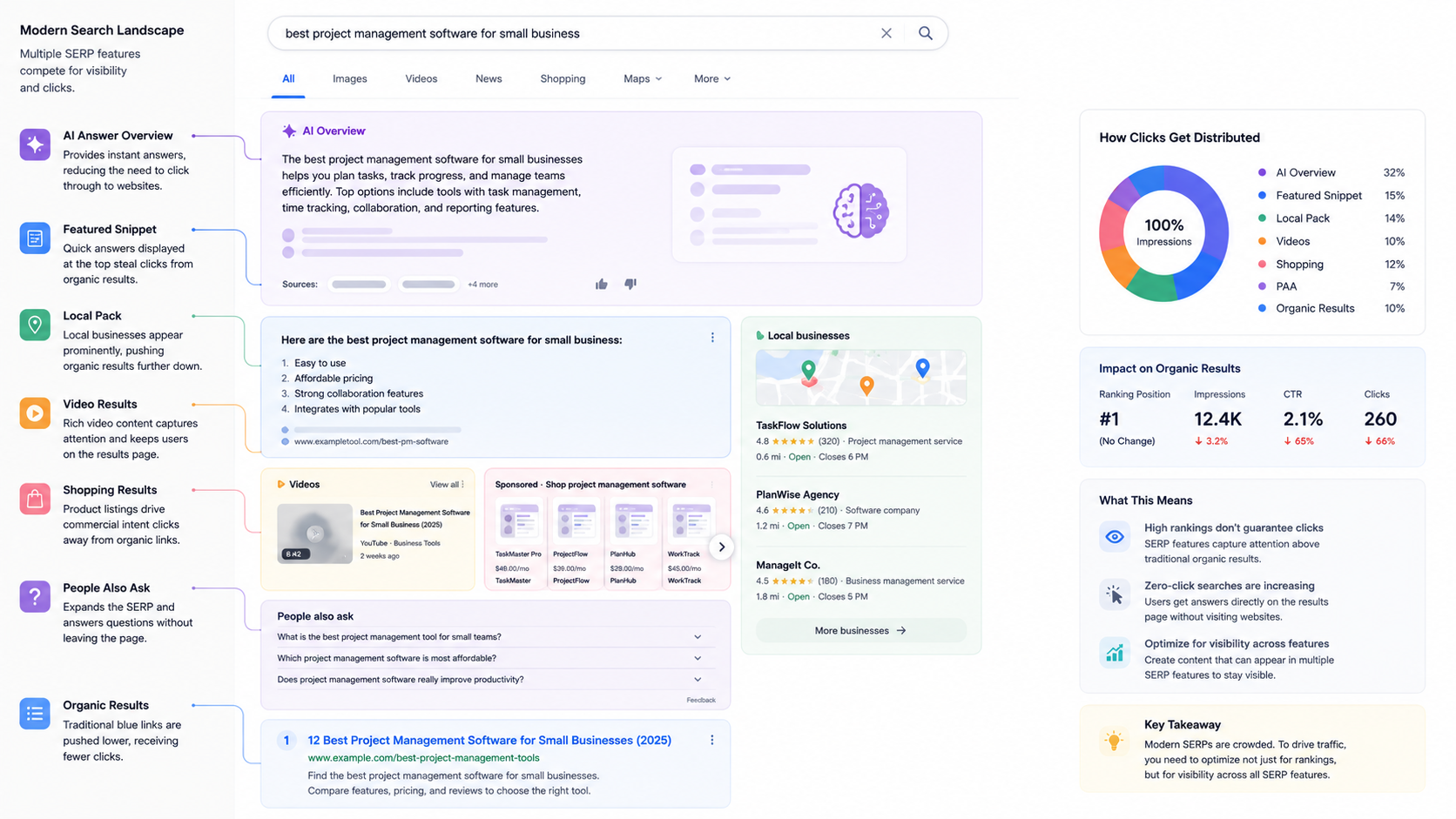
Search results today include much more than blue links.
You may now compete with:
- AI Overviews
- Featured Snippets
- Local Packs
- Videos
- Shopping results
- People Also Ask boxes.
Even if your ranking stays the same, new SERP features can siphon off clicks—and that means fewer leads for your business.
Do not just focus on getting rankings. You should optimize your content to win search features, which can drive more clicks and conversions than a standard link.
Step 4: Review Content Quality
Google's algorithms are getting better at content that demonstrates expertise, originality, and usefulness.
If your content hasn't been updated in years, there's a good chance competitors have published something better.
Instead of counting keywords, ask: Does this page genuinely deserve to rank—and will it help convert visitors into customers?
Identify Thin Content
Pages with very little useful information commonly struggle after Google Core Updates.
Examples of this kind of content are:
- Short service pages
- Outdated blog posts
- Category pages with minimal copy
- Duplicate location pages
You can expand these pages by answering related questions, adding examples, and dealing with user intent more thoroughly.
Refresh Outdated Information
SEO isn't a one-time task.
Review pages for:
- Old statistics
- Broken external links
- Discontinued tools
- Outdated screenshots
- Obsolete recommendations
Fresh content shows Google—and your customers—that your business is active, relevant, and ready to help.
Improve EEAT Signals
Google values content that defines:
- Experience
- Expertise
- Authoritativeness
- Trustworthiness
Strengthen these signals by including:
- Author bios
- Industry credentials
- Original insights
- Case studies
- Customer testimonials
- References to reputable sources
If your article sounds generic, it will not stand out or earn trust, especially now that artificial intelligence-generated content is everywhere.
Originality and expertise are what drive real business results for your website.
Match Search Intent
One of the biggest reasons pages lose rankings is that search intent evolves.
For example, someone searching "SEO audit checklist" today may expect:
- Downloadable templates
- Visual checklists
- Practical workflows
- AI SEO considerations
If your page still reflects what people searched for three years ago, it’s time for an update—otherwise, you risk losing both rankings and new business.
Ask One Simple Question
Before publishing—or refreshing—any page, ask yourself:
Would someone bookmark this article because it's genuinely helpful, or could they find the same information on dozens of other websites?
If the solution is the latter, your content needs a stronger perspective, deeper expertise, or more actionable value to win clicks and conversions.
Step 5: Check Your Backlink Profile
Backlinks remain one of Google's strongest ranking signals. When reputable websites link to your content, they signal that your site is trustworthy and credible.
However, if you've recently lost high-value backlinks, it can result in a clear decline in rankings and organic traffic.
Look for Lost Referring Domains
Use an SEO tool to compare your backlink profile over time.
Pay attention to:
- Recently lost backlinks
- Declining referring domains
- Links pointing to deleted pages
- Broken backlinks returning 404 errors.
If a trusted website removes a link to one of your key pages, your rankings—and your ability to attract new leads—can take a hit.
Recover Lost Link Equity
If important backlinks are on dead pages, you might want to think about:
- Restoring the authentic page
- Redirecting it to the most appropriate live page
- Speak with the referring site to repair the broken link.
Reclaiming lost backlinks is often faster and more cost-effective than building new ones—and it can quickly restore lost traffic.
Evaluate Link Quality
Not all backlinks are beneficial.
A few links from trusted, relevant websites are far more valuable than hundreds of low-quality links.
Build links with:
- Original research
- Helpful resources
- Industry partnerships
- Guest articles on reputable websites
- Share-worthy content
Do not purchase backlinks or participate in link schemes. These tactics can hurt your rankings and damage your reputation—especially after Google’s Spam Updates.
Step 6: Evaluate User Experience Signals
Google's goal is to deliver the best possible experience for searchers. If people visit your website and leave because it is slow or hard to use, your website might not rank well in search results.
While audience engagement metrics aren’t direct ranking factors, they spotlight issues that can hurt both your search visibility and your ability to convert visitors into customers.
Review Engagement Metrics
Check analytics for pages that have lost traffic and look at:
- Average engagement time
- Bounce rate (or engagement rate in GA4)
- Conversion rate
- Pages per session
If visitors are leaving within seconds, ask why.
Are they finding the information they expected? Is the page easy to read? Does it answer the search intent quickly?
Improve Readability
Even great information can be overlooked if it's difficult to consume.
You can make your content easier to read by:
- Using small paragraphs to break up the text.
- Breaking up text with descriptive headings.
- Adding bullets and numbered lists.
- Including relevant images, charts, or screenshots.
- Spotlighting key takeaways.
A well-written article holds readers engaged and encourages them to take the next step—whether that’s exploring more pages or communicating with your team.
Optimize Calls-to-Action
Traffic is valuable, but conversions are what power business growth.
You should review your website to make sure it is clear what you want visitors to do next. Such as:
- Requesting a consultation
- Downloading a resource
- Contacting your team
- Booking a discovery call
If your content brings in visitors but doesn’t drive action, you’re leaving leads and revenue on the table.
Step 7: Compare Your Website to Competitors
SEO doesn't happen in isolation. Even if your website hasn't changed, your competitors probably have.
They may have updated their content, improved their technical SEO, or earned stronger backlinks.
Comparing your website against top-ranking competitors helps you identify what Google is rewarding today.
Examine the Search Results
Search your primary keywords and review the pages ranking above yours.
Ask yourself these questions:
- Is the content on those pages more detailed and helpful?
- Do they have cases or the latest statistics?
- Do they answer more related questions?
- Is the page easier to navigate?
- Are they using pictures, videos, or content you can download?
Your goal isn’t to copy competitors. It’s to understand what makes their content more appealing to users and search engines—so you can win back visibility and conversions.
Look for Content Gaps
One of the fastest ways to improve rankings is by closing gaps in your existing content.
For example, if competitors discuss AI Overviews, EEAT, and Core Web Vitals while your article only covers traditional SEO, your content may no longer meet user expectations.
Update your pages with:
- Fresh insights
- New industry developments
- Frequently asked questions
- Real-world examples
- Helpful advice
The more value you provide, the better your chances of regaining visibility—and turning that visibility into real business growth.
Recovery Plan After a Google Update
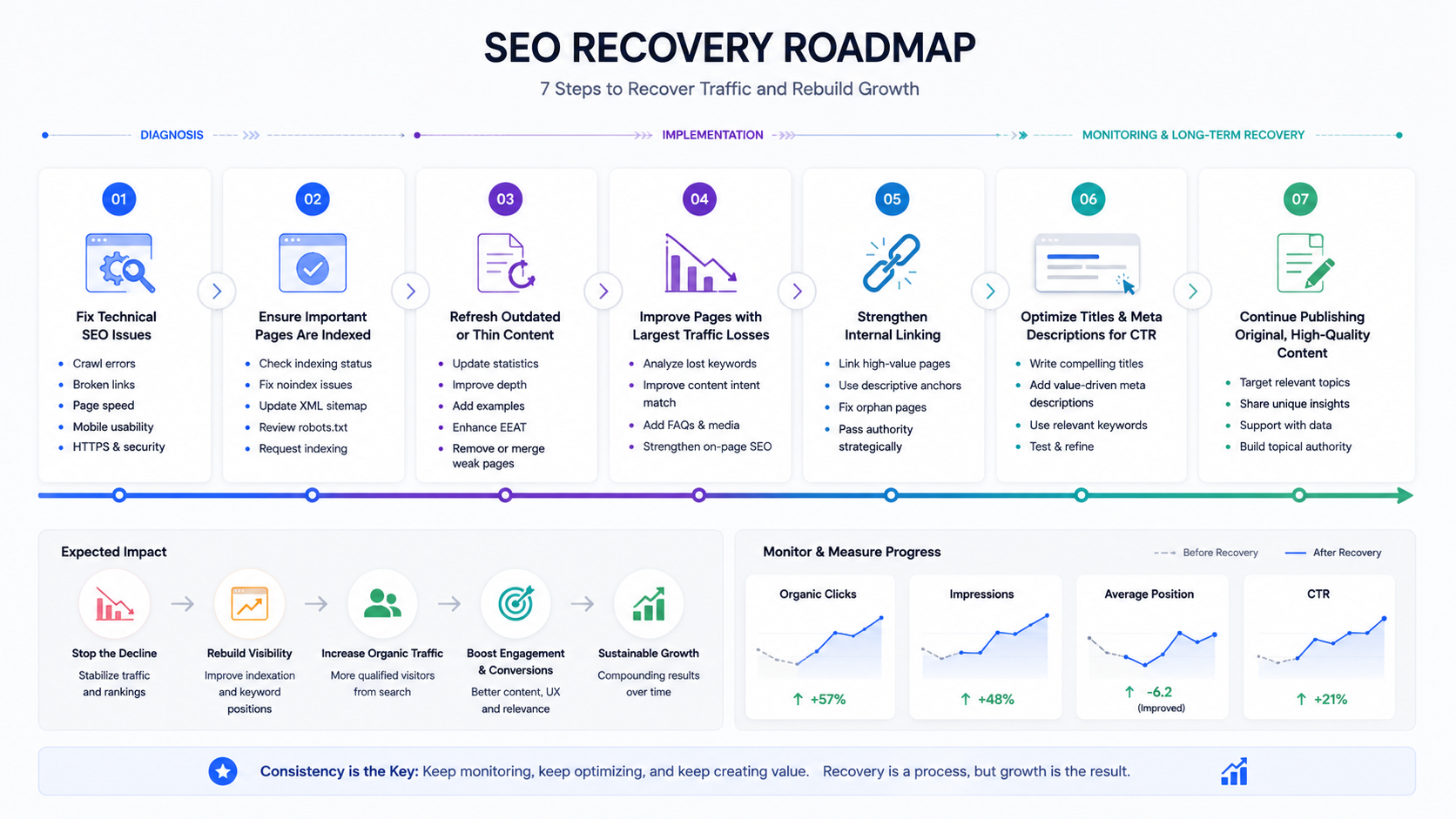
Once you've completed your audit, resist the urge to change everything at once.
A structured recovery plan is far more effective—and protects your revenue—compared to making dozens of random edits.
Prioritize High-Impact Fixes
Begin with issues that are most likely to impact ranking:
- Fix technical SEO issues.
- Make sure that important pages are indexed.
- Update outdated or thin content.
- Improve pages that lost the most traffic.
- Strengthen internal linking.
- Optimize titles and meta descriptions for better CTR.
- Keep creating original and good-quality content.
Be Patient
Recovery after a major Google update rarely happens overnight.
Depending on the issue, improvements may take several weeks—or even months—as Google recrawls and reevaluates your website.
Focus on consistent, strategic improvements—not quick fixes. That’s how you build long-term growth.
Avoid Common Recovery Mistakes
Many websites make their situation worse by reacting too quickly.
Avoid:
- Deleting content without analyzing it.
- Stuffing pages with keywords.
- Buying backlinks from websites.
- Publishing AI-generated content without human review.
- Making big changes to your website without measuring the results.
Instead, monitor your progress, test improvements, and revise your strategy based on real data. That’s how you recover lost traffic and protect your bottom line.
When Should You Hire an SEO Agency?
Some traffic declines are easy to fix on your own. Others require more technical expertise and ongoing optimization.
Consider working with an experienced SEO agency if:
- Organic traffic has continued to decline for several months.
- Your rankings dropped significantly after a Google Core Update.
- You don't have the time or resources to conduct a full SEO audit.
- Technical issues are preventing search engines from indexing your website.
- Competitors consistently outrank your business despite your efforts.
A professional SEO audit uncovers issues that automated tools miss—like crawl inefficiencies, content gaps, lost backlink opportunities, and user experience problems that can quietly drain your leads and revenue.
At 253 Media, we take a data-driven approach to SEO. We don’t guess—we analyze your website’s technical health, content performance, and competitive landscape to build a recovery strategy that drives prolonged growth, leads, and revenue.
Conclusion
When traffic on your site drops, it's easy to feel like your growth story is over, or that it's the end of online lead generation.
Search is an ever-changing entity. Google continually tweaks its algorithms, users evolve, the competition grows, and AI transforms the way people find information. The sites that continue to get better are the ones that respond to change, rather than being afraid of it.
Do not worry too much about every little change Google makes or the latest SEO trend. Just make sure you are giving your audience what they need. Each traffic drop is an opportunity to build a better website and offer, and to produce real content that delivers real business value.
If you're in the business of helping people, your search visibility, and your business become more resilient, no matter how Google changes.
FAQs
Q. Why did my website traffic suddenly drop overnight?
A. A sudden drop can be caused by Google algorithm updates, technical SEO issues, website changes, loss of backlinks, increased competition, or tracking errors. Studying the drop-off in relation to recent Google updates and checking Google Search Console can help determine why it happened.
Q. Can AI Overviews reduce my website traffic?
A. Yes. With AI Overviews, search results can directly answer informational questions, resulting in increased zero-click searches. Your rankings can stay the same, but your CTR could drop because users are getting the information they are looking for without visiting your website.
Q. How long does it take to recover from a Google Core Update?
A. The recovery time depends on the reason for the traffic loss. Some minor fixes (such as Core Updates) can yield results in a few weeks, while a site's recovery from a Core Update can take many months to produce improvements in search rankings for the content.
Q. Should I update all my content after a traffic drop?
A. No. First, you need to know which pages are losing the most traffic or rankings. Make optimizing those pages a priority rather than making site-wide changes to make ‘the site faster’ without data to back it up.
Q. What is the first step in an SEO audit?
A. The first step is reviewing Google Search Console to analyze changes in clicks, impressions, keyword rankings, and indexing. This gives useful insights into which traffic has been lost and helps guide the rest of your audit.